

10 Best Practices for Software Deployment in 2025
Table of Contents
In a competitive market, the ability to deploy software quickly, reliably, and securely is a critical business function. A flawed deployment can lead to service outages, security vulnerabilities, and a loss of user trust, while a streamlined process accelerates innovation and provides a significant competitive advantage. Navigating the complexities of modern software delivery requires more than just pushing code. It demands a strategic approach grounded in proven methodologies.
This guide presents 10 essential best practices for software deployment, moving beyond generic advice to offer actionable strategies that you can implement immediately. We will explore a comprehensive set of techniques designed to de-risk your release process and enhance operational efficiency.
You will learn how to build a robust foundation with Continuous Integration/Continuous Deployment (CI/CD) pipelines and manage your environments consistently using Infrastructure as Code (IaC). We will also cover advanced deployment patterns like blue-green and canary releases, which minimize downtime and user impact. Furthermore, this listicle details critical components such as automated testing, feature flag management, and safe database migration strategies. Whether you are an early-stage startup founder aiming for rapid MVP delivery or a CTO refining your team's DevOps culture, mastering these practices will transform your deployment process from a source of anxiety into a well-oiled machine that consistently delivers value.
1. Continuous Integration/Continuous Deployment (CI/CD)
Continuous Integration/Continuous Deployment (CI/CD) is the cornerstone of modern, agile software development. It's a practice that automates the software release process, enabling teams to deliver code changes more frequently and reliably. This approach transforms deployment from a high-stakes, manual event into a routine, low-risk operation, making it one of the most critical best practices for software deployment today.
Continuous Integration (CI) is the practice of developers merging their code changes into a central repository multiple times a day. Each merge triggers an automated build and test sequence. Continuous Deployment (CD) extends this by automatically deploying every validated change to the production environment. This rapid feedback loop significantly reduces integration issues and accelerates the delivery of value to users.
How to Implement CI/CD Effectively
Getting started with CI/CD doesn't require overhauling your entire workflow overnight. The key is to begin with a foundational pipeline and incrementally enhance it.
- Start with Simple Pipelines: Begin by automating the most repetitive tasks: compiling code, running unit tests, and packaging the build artifact. Tools like Jenkins, GitHub Actions, or GitLab CI/CD make this initial setup straightforward.
- Ensure Comprehensive Testing: Before enabling automatic deployments, you must have a robust automated testing suite. This includes unit, integration, and end-to-end tests to validate that new changes don't introduce regressions or break existing functionality.
- Use Feature Flags: Implement feature flags (or feature toggles) to decouple deployment from release. This allows you to deploy new, unfinished code to production behind a flag, keeping it hidden from users. You can then enable the feature for specific user segments for testing or a full rollout without another deployment.
The following infographic illustrates the fundamental flow of a CI/CD pipeline, showing how code moves from a developer's machine to the production environment through automated stages.
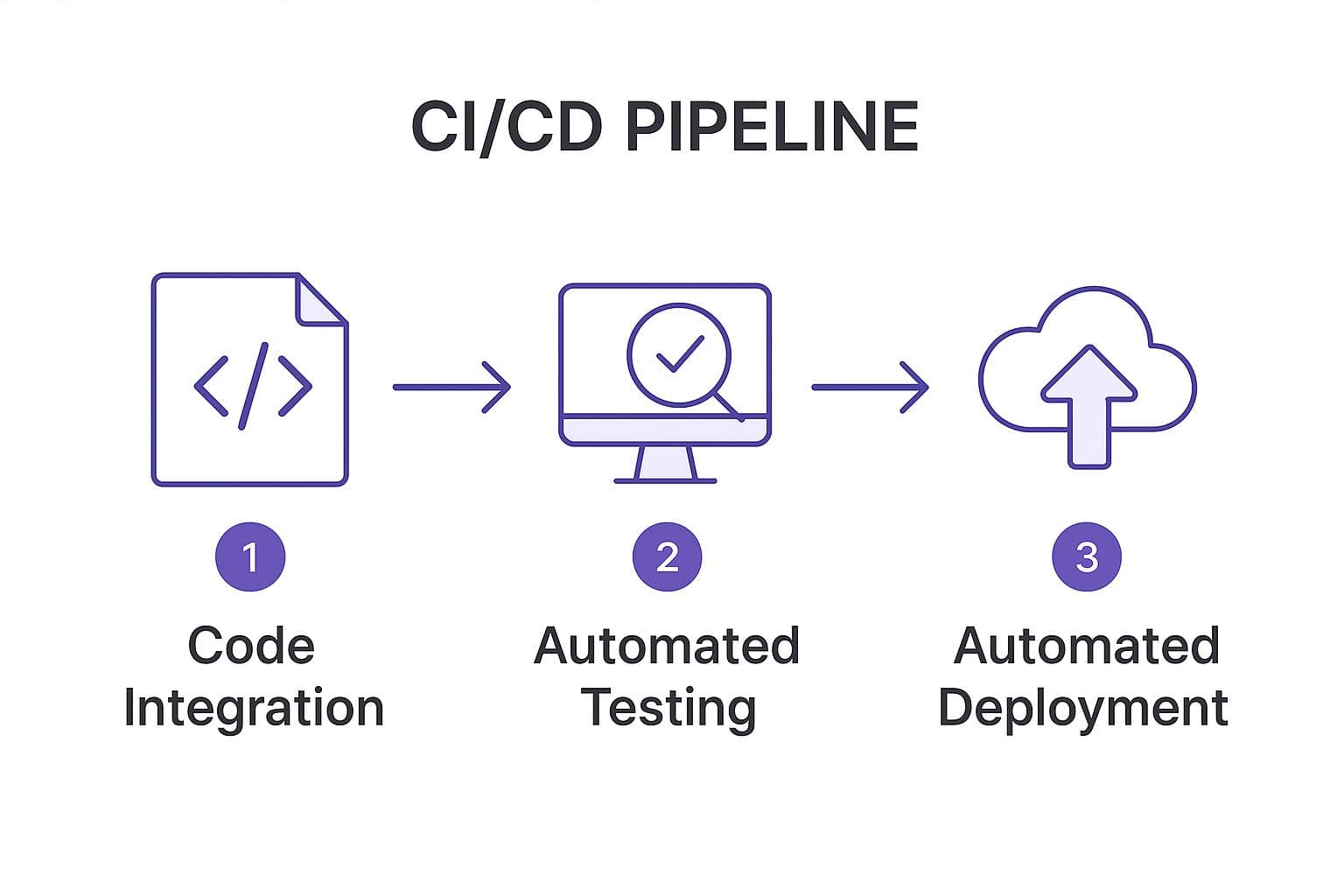
This streamlined process ensures that every piece of code is automatically built, tested, and deployed, creating a consistent and reliable path to production. By automating these distinct stages, teams eliminate manual errors and ensure that only quality-assured code reaches users, directly supporting best practices for software deployment.
2. Blue-Green Deployment
Blue-green deployment is a release strategy designed to minimize downtime and reduce the risk associated with deploying new software versions. This technique involves maintaining two identical, isolated production environments, referred to as "Blue" and "Green." Only one environment (e.g., Blue) is live at any given time, serving all production traffic, while the other (Green) remains idle. This approach provides a stable, predictable foundation, making it a crucial component of modern best practices for software deployment.
When a new version of the software is ready for release, it's deployed to the idle Green environment. Here, it can undergo a full suite of tests, from automated checks to manual verification, without impacting any live users. Once the new version is validated and confirmed to be stable, traffic is rerouted from the Blue environment to the Green environment. The Green environment is now live, and the old Blue environment becomes the idle one, ready for the next deployment cycle.

This method offers an instantaneous rollback capability. If any issues are detected after the switch, traffic can be immediately routed back to the old Blue environment, which is still running the stable, previous version.
How to Implement Blue-Green Deployment Effectively
Successfully adopting blue-green deployment requires careful planning around infrastructure, data, and testing protocols. The key is to ensure both environments are truly identical and that the switchover is seamless.
- Implement Robust Health Checks: Before switching traffic, run comprehensive health checks on the Green environment. These checks should validate not just that the application is running but also that it can connect to databases, third-party services, and other critical dependencies. The switch should only occur if all health checks pass.
- Manage Database Migrations Carefully: Database schema changes are a common challenge. Your strategy must ensure that both the new and old versions of the application can work with the database schema during the transition. This often involves making changes backward-compatible or using a phased migration approach.
- Automate the Traffic Switch: The process of switching traffic should be fully automated. Use a load balancer or a router that can be updated via an API call. Manual switching is prone to error and can defeat the purpose of a rapid, low-risk deployment.
By isolating the deployment from the release, blue-green deployment provides a powerful safety net. It ensures that users are only ever exposed to a fully tested and validated version of the application, solidifying its place among the best practices for software deployment. This approach is famously used by companies like Netflix and is supported by platforms like AWS CodeDeploy.
3. Canary Deployments
Canary deployment is a sophisticated strategy for releasing new software versions by gradually rolling them out to a small subset of users before making them available to everyone. This technique allows teams to monitor the impact of changes in a real-world environment with minimal risk. If the new version performs as expected, it is incrementally rolled out to a larger audience. If issues arise, the deployment is rolled back, affecting only a small percentage of users.
This progressive delivery method, named after the "canary in a coal mine" analogy, acts as an early warning system for potential problems. It's one of the most effective best practices for software deployment because it minimizes blast radius and provides a high-confidence path to production. Companies like Google and Facebook rely on canary releases to deploy updates to massive services like Search and the News Feed, ensuring stability for billions of users.

How to Implement Canary Deployments Effectively
Successfully executing a canary release requires careful planning and robust automation. The goal is to make data-driven decisions about whether to proceed with a full rollout or to abort the release.
- Define Clear Success Metrics: Before starting, establish specific, measurable Key Performance Indicators (KPIs) to evaluate the health of the canary release. These should include business metrics like conversion rates and technical metrics like CPU utilization, memory usage, and application error rates.
- Start with a Small, Low-Risk Audience: Initially, direct only a tiny fraction of traffic (e.g., 1-5%) to the new version. You can begin with an even safer group, such as internal employees or beta testers, to gather feedback before exposing the release to external customers.
- Implement Comprehensive Monitoring and Alerting: Your monitoring tools must be able to differentiate between the old and new versions. Set up automated alerts that trigger if the canary version's error rate or latency exceeds predefined thresholds, enabling a swift response.
- Automate Rollback Triggers: The ultimate goal is to create a system that can automatically roll back a faulty canary deployment without human intervention. If key metrics degrade past a certain point, the system should automatically shift all traffic back to the stable version.
This strategic approach allows you to validate new code with live production traffic while containing any potential negative impact. By leveraging canary deployments, teams can confidently deliver innovations faster, making it an essential component of any modern software deployment strategy.
4. Infrastructure as Code (IaC)
Infrastructure as Code (IaC) is the practice of managing and provisioning computing infrastructure through machine-readable definition files, rather than through manual processes or interactive configuration tools. This approach treats your servers, networks, and databases just like application code, enabling version control, automated testing, and repeatable deployments. It is a foundational element in creating a stable, scalable, and secure environment, making it one of the essential best practices for software deployment.
By defining infrastructure in code using tools like Terraform or AWS CloudFormation, teams can eliminate configuration drift, where manual changes over time lead to inconsistencies between environments. Every change is tracked, reviewed, and applied systematically, dramatically reducing the risk of human error. This practice ensures that your development, staging, and production environments are identical, a critical factor for reliable software releases. Capital One, for instance, leverages AWS CloudFormation to securely manage its banking infrastructure, ensuring compliance and consistency.
How to Implement IaC Effectively
Adopting IaC transforms infrastructure management from a reactive task into a proactive, strategic advantage. You can start small and expand your coded infrastructure over time.
- Start with Simple Components: Begin by codifying a single, well-understood piece of your infrastructure, like a virtual server or a storage bucket. This helps your team learn the tools and processes without disrupting critical systems.
- Use Modules for Reusability: Create reusable modules for common infrastructure patterns, such as a standard web server configuration or a database cluster. This approach, used heavily by organizations like Uber with Terraform, accelerates provisioning and enforces architectural standards.
- Implement Proper State Management: Your IaC tool uses a state file to track the resources it manages. Protecting this file is crucial. Use remote backends with locking mechanisms and ensure regular backups to prevent state corruption or loss.
This methodical approach to infrastructure management ensures that your environments are as reliable and version-controlled as your application code itself. By codifying your infrastructure, you build a resilient foundation that supports agile development and rapid, predictable deployments. To further explore the strategic impact of this practice, you can learn more about Infrastructure as Code (IaC) and its role in modern development.
5. Automated Testing in Deployment Pipeline
Automated testing is the practice of integrating various levels of tests directly into the deployment pipeline to validate code quality and functionality at every stage. This approach ensures that any new changes are automatically verified against a suite of tests, preventing bugs and regressions from ever reaching production. By making testing an inseparable part of the delivery process, teams can deploy with confidence, making it a non-negotiable best practice for software deployment.
This practice involves running unit, integration, system, and acceptance tests automatically whenever code is committed or a build is created. Companies like Shopify exemplify this by running over 170,000 tests on every single code change, guaranteeing stability. This systematic validation is crucial for maintaining a high-quality product while still enabling rapid development and frequent releases.
How to Implement Automated Testing Effectively
Integrating automated tests requires a strategic approach that prioritizes speed and coverage without slowing down the development cycle. The goal is to catch issues early and provide rapid feedback to developers.
- Implement the Testing Pyramid: Structure your tests according to the testing pyramid model, as advocated by thought leaders like Martin Fowler. Focus on a large base of fast-running unit tests, a smaller layer of integration tests, and a very small number of comprehensive but slower UI or end-to-end tests.
- Use Test Doubles and Mocking: Isolate the code you are testing by using test doubles (like mocks, stubs, and fakes) to simulate external dependencies such as databases or third-party APIs. This makes tests faster, more reliable, and less prone to external failures.
- Maintain Fast Test Suites: A key goal of automated testing in a pipeline is quick feedback. Continuously monitor and optimize test execution times. Parallelize test runs and regularly refactor or remove slow, inefficient tests to keep the feedback loop tight.
By embedding a robust testing strategy into your pipeline, you transform it from a simple automation tool into a powerful quality gate. This ensures every deployment is not just fast but also fundamentally sound. For more information on different testing approaches, you can explore various quality assurance testing methods on iglu.dev.
6. Feature Flags/Toggle Management
Feature flags, also known as feature toggles, are a powerful technique that allows teams to modify system behavior without changing or deploying code. This practice enables developers to wrap new functionality in a conditional block that can be turned on or off in real-time. By separating feature releases from code deployments, organizations can gain granular control over who sees a new feature, making this an essential component of modern software deployment best practices.
This approach effectively de-risks the deployment process. You can push new, un-tested code to production behind a disabled flag, ensuring it has no impact on users. Once deployed, the feature can be enabled for internal teams, a small percentage of users, or specific demographics. This facilitates controlled rollouts, A/B testing, and provides an instant "kill switch" to disable a problematic feature without needing a complex rollback.
How to Implement Feature Flags Effectively
Successfully managing feature flags requires a strategic approach beyond simply adding conditional statements to your code. A disciplined process ensures flags provide flexibility without creating unmanageable technical debt.
- Establish a Flag Lifecycle: Implement a clear process for creating, managing, and retiring flags. Each flag should have a defined purpose, an owner, and a planned removal date. This prevents the accumulation of "stale" flags that complicate the codebase over time.
- Use Meaningful Naming and Documentation: Name flags descriptively so their purpose is immediately clear (e.g., enable-new-user-dashboard instead of flag-123). Maintain central documentation detailing what each flag controls, its potential impact, and its current status.
- Integrate with Monitoring: Connect your feature flag system to your monitoring and observability tools. Track how enabling or disabling a flag affects application performance, error rates, and key business metrics. This data is critical for making informed decisions during a rollout.
- Regularly Clean Up Obsolete Flags: Once a feature is fully rolled out and stable, or if an experiment is concluded, the corresponding flag and its associated code should be removed. Regular cleanup sprints are crucial for maintaining a clean and understandable codebase.
7. Database Migration Strategies
Database migration strategies are systematic approaches for managing changes to your database schema and data during a software deployment. Handling database updates is often one of the most complex and high-risk aspects of a release, as mistakes can lead to data corruption or significant downtime. A well-defined strategy ensures these transitions are smooth, reliable, and preserve data integrity, making it a non-negotiable part of any list of best practices for software deployment.
These strategies involve more than just running a script; they require careful planning for how schema changes, data transformations, and backfills are applied to a live database. The goal is to evolve the database in lockstep with the application code, preventing mismatches that cause errors. For example, when adding a new non-nullable column to a large table, a naive ALTER TABLE command could lock the table for an extended period, causing an outage. A proper strategy would handle this in a non-blocking, multi-step process.
How to Implement Database Migration Strategies Effectively
Implementing robust database migrations means treating them with the same rigor as application code. This involves versioning, testing, and planning for both success and failure.
- Test Migrations Rigorously: Never run a migration in production without first testing it on a staging environment with a realistic, production-sized data set. This helps you identify performance bottlenecks, locking issues, or unexpected data changes before they impact real users.
- Use Online Schema Change Tools: For large tables where downtime is unacceptable, use online schema change tools. Tools like GitHub's gh-ost or Percona's pt-online-schema-change work by creating a "ghost" copy of your table, migrating it, and then cutting over with minimal locking.
- Decouple Migrations from Deployments: Run your database migration as a separate step before or after your application deployment. This prevents a failed deployment from leaving your database in an inconsistent state. For backward-compatible changes (like adding a new table or nullable column), you can run the migration before deploying the code. For backward-incompatible changes, a multi-step release is required.
- Plan for Rollbacks: Every migration must have a corresponding rollback plan. This could be a "down" script that reverses the schema change or a database backup and recovery procedure. Knowing how to undo a migration is just as important as knowing how to apply it.
Organizations like Shopify and Stripe have pioneered zero-downtime database migration techniques, building custom tooling and processes to handle changes at a massive scale. By adopting these principles, you can transform risky database updates into a routine, automated part of your deployment pipeline, which is a core tenet of modern software delivery.
8. Monitoring and Observability
Deploying software without a clear view into its performance is like flying blind. Monitoring and observability are essential practices that provide deep insights into your application's health, user experience, and infrastructure stability post-deployment. While often used together, monitoring tells you when something is wrong, while observability helps you understand why it's wrong. Adopting both is a non-negotiable best practice for software deployment in complex, distributed systems.
Monitoring involves collecting predefined sets of metrics and logs to track system performance against known failure modes. Observability, on the other hand, is about designing systems to be explorable. It allows you to ask new questions about system behavior without needing to ship new code, which is crucial for diagnosing unknown issues. Together, they enable teams to detect problems, minimize downtime, and ensure a smooth user experience after every release.
How to Implement Monitoring and Observability Effectively
A robust strategy goes beyond simply collecting data; it involves creating a feedback loop that informs future development and operational decisions.
- Implement the Three Pillars: Your observability strategy should be built on three core data types: metrics (numeric data like CPU usage or request latency), logs (timestamped records of events), and traces (which show the journey of a request through multiple services). Tools like Prometheus, Grafana, and Jaeger can help you implement this foundation.
- Set Up Deployment-Specific Dashboards: Create dashboards that specifically track the health of a new release. These should display key Service Level Indicators (SLIs) like error rates, latency, and system saturation for the newly deployed version side-by-side with the old version. This allows for immediate comparison and quick detection of deployment-induced regressions.
- Establish Clear Alerting and Escalation: Not every anomaly requires waking up an engineer at 3 AM. Define clear Service Level Objectives (SLOs) and create tiered alerting rules based on their severity. Establish on-call rotations and clear escalation paths to ensure critical alerts are addressed swiftly by the right people, preventing alert fatigue and burnout.
By integrating these practices, you transform deployment from a "fire-and-forget" action into a data-driven, iterative process. This proactive approach to system health is a hallmark of high-performing engineering teams and is a fundamental component of modern best practices for software deployment.
9. Deployment Automation and Orchestration
Deployment automation and orchestration are fundamental practices for achieving efficient and reliable software delivery at scale. This involves using specialized tools to automate the entire deployment lifecycle, from provisioning infrastructure to deploying applications and coordinating services. By codifying the deployment process, teams eliminate manual intervention, which is a major source of errors, inconsistencies, and delays. This approach transforms complex deployments into predictable, repeatable, and auditable workflows.
While CI/CD pipelines automate the build-test-deploy sequence, orchestration tools manage the broader ecosystem where the application lives. For instance, an orchestrator like Kubernetes can manage containerized application lifecycles, ensuring they are running, scaled correctly, and can communicate with each other. This level of control is essential for modern microservices architectures and represents one of the most impactful best practices for software deployment.
How to Implement Deployment Automation and Orchestration
Effective implementation goes beyond simple scripting and involves creating a robust, self-managing system. The goal is to build a deployment process that is not only automated but also resilient.
- Start with Infrastructure as Code (IaC): Use tools like Terraform or AWS CloudFormation to define and provision your environments. This ensures that your staging and production environments are identical, eliminating "it works on my machine" issues and making deployments more predictable.
- Implement Robust Error Handling: Your automation scripts and pipelines must include sophisticated error handling and retry logic. A deployment shouldn't fail completely due to a transient network issue. Instead, it should be able to attempt a retry or execute a safe rollback procedure automatically.
- Maintain Detailed Logs and Audit Trails: Every automated action, from provisioning a server to deploying a new service version, must be logged. Comprehensive audit trails are crucial for debugging failed deployments, meeting compliance requirements, and understanding the history of your production environment. Great examples of this in practice include LinkedIn's use of Jenkins for complex pipelines and Spotify's reliance on Kubernetes for microservices orchestration.
10. Rollback and Recovery Planning
Rollback and recovery planning is a critical safety net in the software deployment process. It involves creating and testing comprehensive strategies to quickly revert a system to a previously stable state when a deployment introduces critical bugs, performance degradation, or other failures. Rather than being an afterthought, this plan is a core component of a resilient deployment strategy, ensuring that failures have minimal impact on users and business operations.
This practice moves beyond simply hoping for the best; it prepares for the worst. A solid rollback plan includes automated triggers, data recovery procedures, and clear communication protocols for incident response. For example, Netflix pioneered automated rollbacks based on real-time error rate thresholds, while Amazon’s deployment systems for AWS services often feature one-click rollback capabilities. These mechanisms are fundamental to maintaining high availability and are one of the most important best practices for software deployment.
How to Implement Rollback and Recovery Effectively
Effective rollback planning is proactive, not reactive. It requires forethought during the design and development phases to ensure that reverting a change is as seamless and reliable as deploying one.
- Implement Automated Rollback Triggers: Don't rely on manual intervention alone. Configure your monitoring and alerting systems to automatically trigger a rollback when key health metrics, like error rates or API latency, cross predefined critical thresholds. This drastically reduces the mean time to recovery (MTTR).
- Maintain Database Schema Compatibility: Design database changes to be backward compatible. For instance, instead of renaming or deleting a column, add a new one and deprecate the old one. This ensures that the previous version of the application can still function correctly with the updated database schema if a rollback is necessary.
- Test Rollback Procedures Regularly: A rollback plan is useless if it doesn't work. Regularly test your rollback procedures in a staging environment as part of your deployment drills. This helps identify and fix issues with the process before a real crisis occurs.
A well-defined rollback strategy is an essential part of any successful launch. When preparing your release, integrating these procedures into a larger checklist ensures no critical safety measures are overlooked. For a comprehensive guide, you can explore this product launch checklist template on iglu.dev.
By treating rollback capabilities as a first-class feature of your deployment pipeline, you build a more robust and trustworthy system. This approach provides the confidence needed to deploy more frequently while safeguarding the user experience against inevitable issues.
Best Practices for Software Deployment: 10-Point Comparison
| Deployment Strategy / Practice | 🔄 Implementation Complexity | ⚡ Resource Requirements | 📊 Expected Outcomes | 💡 Ideal Use Cases | ⭐ Key Advantages |
|---|---|---|---|---|---|
| Continuous Integration/Continuous Deployment (CI/CD) | High - requires setup of automated pipelines | High - infrastructure for automation & tests | Frequent, reliable deployments with early bug detection | Teams aiming for rapid, frequent code releases | Faster time to market, improved code quality |
| Blue-Green Deployment | Medium-High - involves managing parallel envs | Very High - double infrastructure needed | Zero downtime deployments, easy rollback | Applications needing zero or minimal downtime | Minimal downtime, instant rollbacks |
| Canary Deployments | High - complex traffic routing and monitoring | Medium-High - requires sophisticated monitoring | Gradual rollout reducing blast radius | Progressive rollouts targeting subset of users | Early issue detection, controlled risk |
| Infrastructure as Code (IaC) | Medium - learning curve & tool-specific knowledge | Medium - automated provisioning tools | Consistent, repeatable infrastructure deployments | Infrastructure provisioning and environment setup | Reduced human error, faster environment provisioning |
| Automated Testing in Deployment Pipeline | Medium - multi-level test integration | Medium-High - test execution resources | Higher software quality with faster feedback | Improving test coverage to enhance deployment confidence | Early bug detection, reduced manual testing effort |
| Feature Flags/Toggle Management | Medium - added code complexity and management | Low-Medium - mostly software overhead | Decoupled feature release from deployment | Controlled feature rollout, experimentation | Quick rollback without deployment, supports A/B testing |
| Database Migration Strategies | High - complex planning & execution | Medium - migration tooling and storage needs | Smooth DB transitions with minimal downtime | Deployments involving schema and data changes | Maintains data integrity, supports zero-downtime |
| Monitoring and Observability | Medium-High - setup of comprehensive systems | Medium-High - storage and processing costs | Early problem detection and data-driven decisions | Ensuring system reliability during deployments | Faster issue resolution, improved system reliability |
| Deployment Automation and Orchestration | High - development of automated workflows | Medium-High - automation and orchestration tools | Consistent, scalable deployments | Large scale, repeatable deployment processes | Reduced manual errors, faster deployment cycles |
| Rollback and Recovery Planning | Medium - complex rollback and recovery strategies | Medium - backup infrastructure and tooling | Minimized downtime and deployment risks | Critical systems requiring fail-safe deployments | Minimized downtime, improved incident response |
Building a Resilient Deployment Culture
Navigating the landscape of modern software delivery requires more than just good code; it demands a sophisticated, resilient, and repeatable deployment process. Throughout this guide, we've explored a comprehensive suite of best practices for software deployment designed to transform your release cycle from a source of anxiety into a strategic advantage. This journey is not about adopting a single tool or trick but about fundamentally shifting your team's culture towards one of continuous improvement, automation, and proactive risk management.
The practices we've detailed, from implementing CI/CD pipelines to mastering Infrastructure as Code (IaC), are not isolated tactics. They are interconnected pillars that support a robust and agile delivery ecosystem. When you combine automated testing with strategic deployment patterns like canary releases or blue-green deployments, you create a powerful safety net. This allows your team to innovate with confidence, knowing that potential issues can be detected early and contained effectively.
From Theory to Actionable Strategy
The true value of these principles emerges when they are integrated into a cohesive strategy. Think of your deployment pipeline as the central nervous system of your development process.
- Automation as the Foundation: Embracing CI/CD, deployment orchestration, and IaC removes the potential for human error, increases speed, and ensures consistency across every environment. This is your first and most critical step toward building a mature deployment model.
- Safety and Risk Mitigation: Techniques like feature flags, careful database migration strategies, and comprehensive automated testing are your primary defense mechanisms. They allow you to de-risk releases by decoupling deployment from exposure, giving you granular control over who sees new features and when.
- Visibility and Recovery: Robust monitoring and observability are not just for post-deployment checks; they are your eyes and ears during the release process itself. When paired with a well-rehearsed rollback and recovery plan, this visibility ensures that when something inevitably goes wrong, you can respond swiftly and decisively to minimize impact.
For startup founders, CTOs, and entrepreneurs, internalizing these best practices for software deployment is a critical differentiator. In a competitive market, the ability to ship features quickly, reliably, and securely is not a luxury; it is a core business competency. Building this foundation from your MVP stage ensures your product is engineered for scalability and long-term success, preventing the accumulation of technical debt that can cripple growth later on.
Cultivating a Mindset of Continuous Improvement
Ultimately, the goal is to create a virtuous cycle. A faster, safer deployment pipeline provides quicker feedback from production environments. This feedback, funneled through your monitoring and observability tools, informs the next development cycle, leading to better, more resilient features. This continuous feedback loop empowers your developers, delights your users, and accelerates your company’s ability to adapt and innovate.
Adopting these practices is an ongoing commitment. It requires investment in tools, training, and, most importantly, a cultural shift that prioritizes quality and stability alongside speed. Start small, perhaps by automating one part of your pipeline or implementing a simple feature flag system. Celebrate small wins, learn from every deployment, and steadily build a deployment culture that becomes a cornerstone of your engineering excellence. Your future self, and your future customers, will thank you for it.
Ready to build your next product on a foundation of elite deployment practices from day one? The expert team at Iglu Digital specializes in rapid MVP development that bakes in these principles, ensuring your application is scalable, reliable, and ready for market. Let us help you turn your idea into a high-quality, production-ready product, faster. Learn more at Iglu Digital.