

Your Agile Sprint Planning Template
Table of Contents
An agile sprint planning template is basically your team's game plan, put into a reusable format. It's a structured document that helps everyone get on the same page to define the sprint goal, pick the right user stories from the backlog, and figure out who's doing what. Instead of chaotic planning meetings, you get a repeatable, efficient process.
Why a Good Template is a Game-Changer for Sprint Planning

Let’s be real for a moment. We've all been in those unstructured sprint planning meetings that feel like you're just winging it. You kick things off with a ton of energy, but without a clear framework, the whole thing can quickly go off the rails. The result? Missed deadlines, a team on the verge of burnout, and objectives that are fuzzy at best. This is exactly where a solid sprint planning template can completely change the dynamic.
Think of it less as another piece of paperwork and more as a shared roadmap. It’s the tool that keeps communication flowing, helps you set goals that are actually achievable, and makes managing the workload transparent for everyone. It helps you nail down the answers to the two most important questions: "What can we realistically get done?" and "How are we going to do it?"
Taming the Chaos with Structure
The biggest win you get from a template is consistency. It's that simple. When your team uses the same format sprint after sprint, the process becomes second nature. No one has to hunt for the sprint goal, wonder who’s assigned to a particular user story, or guess how capacity was calculated. It's all right there. This kind of repetition builds muscle memory, which dramatically cuts down on the administrative busywork that can bog down a planning session.
This need for a reliable process is more critical than ever. The explosion in Agile adoption tells the story—recent industry reports show it skyrocketed from 37% to 86% among software teams in just one year. And for the vast majority of those teams—86% of them, in fact—sprint planning meetings are the absolute bedrock for organizing their work. You can dig deeper into these agile adoption trends and statistics if you're curious.
Moving from Guesswork to Predictable Delivery
A great template doesn't let your team hide from reality, especially when it comes to capacity. By making everyone formally document their availability—factoring in holidays, appointments, and other commitments—you stop making optimistic guesses and start making data-driven decisions. This transparency is incredibly empowering; it gives the team the confidence and the data to push back when they’re being overcommitted, leading to much more achievable sprint goals.
When you make that shift from guessing to planning, a few things start to happen almost immediately:
- Everyone is more focused. A clear, visible sprint goal keeps the team pulling in the same direction.
- Collaboration gets a major boost. The template becomes the central point for discussion, making sure every voice is heard.
- Your delivery becomes predictable. When you track velocity and capacity over time, your forecasting becomes surprisingly accurate.
- Burnout becomes less of a risk. Realistic planning means the team isn't constantly feeling overloaded and playing catch-up.
Essential Components of a Powerful Sprint Planning Template
To really get the most out of this, your template needs a few non-negotiable elements. Each one plays a specific role in turning a chaotic meeting into a well-oiled planning session.
| Component | Its Role and Primary Benefit |
|---|---|
| Sprint Goal | A clear, one-sentence objective for the sprint. It provides focus and a rallying cry for the team. |
| Team Capacity | A calculation of available work hours, accounting for time off. This prevents overcommitment and burnout. |
| User Stories / Backlog Items | The specific tasks selected from the product backlog. This defines the "what" of the sprint's scope. |
| Story Points / Estimates | The team's estimation of effort for each item. This is crucial for capacity planning and velocity tracking. |
| Task Breakdowns | The smaller, actionable steps needed to complete a user story. This clarifies the "how" and helps with daily progress. |
| Dependencies & Blockers | A section to note any external factors or risks. This promotes proactive problem-solving. |
Without these core pieces, a template is just a glorified to-do list. But with them, it becomes a powerful tool for alignment, transparency, and, most importantly, successful sprints.
Building Your First Sprint Planning Template from Scratch
Jumping into creating a custom agile sprint planning template can feel like a big undertaking, but it’s really just about putting the right foundational pieces in place. The idea isn't to build something overly complicated from the get-go. Instead, aim for a simple, functional framework that gives your team clarity. Whether you use a basic spreadsheet, a Notion page, or a more robust tool like Jira, the principles are the same.
The very first thing you need to lock down is the Sprint Goal. Think of this as your team's North Star for the next couple of weeks. It should be a single, punchy sentence that everyone on the team can get behind. A solid sprint goal might be something like: "Launch the user profile page with editing capabilities to enable personalization." This simple statement becomes the anchor for every decision you make during the sprint.
Laying Out the Sprint Backlog
Once you have your goal, it's time to structure the backlog for the sprint. This is the list of user stories or tasks the team is actually committing to completing. I've found that a simple table is the clearest and most effective way to display this.
At a bare minimum, your backlog table should have these columns:
- User Story/Task: A quick, clear description of the work.
- Story Points: The team's collective estimate of the effort involved.
- Assignee: Who's grabbing this particular task.
- Status: A straightforward tracker, like To Do, In Progress, and Done.
This simple layout makes the sprint's scope obvious at a glance and gives everyone an easy way to see progress without getting lost in a complex tool.
Getting Real About Your Team's Capacity
One of the most common pitfalls I see in sprint planning is teams overcommitting because they didn't honestly assess their capacity. Adding a small capacity planning section to your template is a game-changer. It’s not about complex algorithms; it's just about doing some honest math.
Start with the total possible workdays. Let's say you have a two-week (10-day) sprint and a 5-person team. That sounds like 50 person-days, right? But now, start subtracting all the time people won't be heads-down on sprint work.
Here’s a realistic example:
- Public Holidays: If there’s a holiday, that’s 5 person-days gone right off the top.
- Personal Time Off: One developer is taking a 2-day vacation? Subtract those.
- Meetings & Ceremonies: Don't forget daily stand-ups, retros, and refinement meetings. If these take up about 15% of everyone’s time, that’s another 7.5 person-days you can’t use for development.
Suddenly, that team with 50 potential days really only has 35.5 productive days to work with. Committing to a sprint based on this number, not the fantasy number, is how you set yourself up for success. Nailing down effort estimates is a skill in itself; for a deeper dive, check out our guide on estimating software development time.
This process helps visualize how to match your backlog to your team's actual availability.
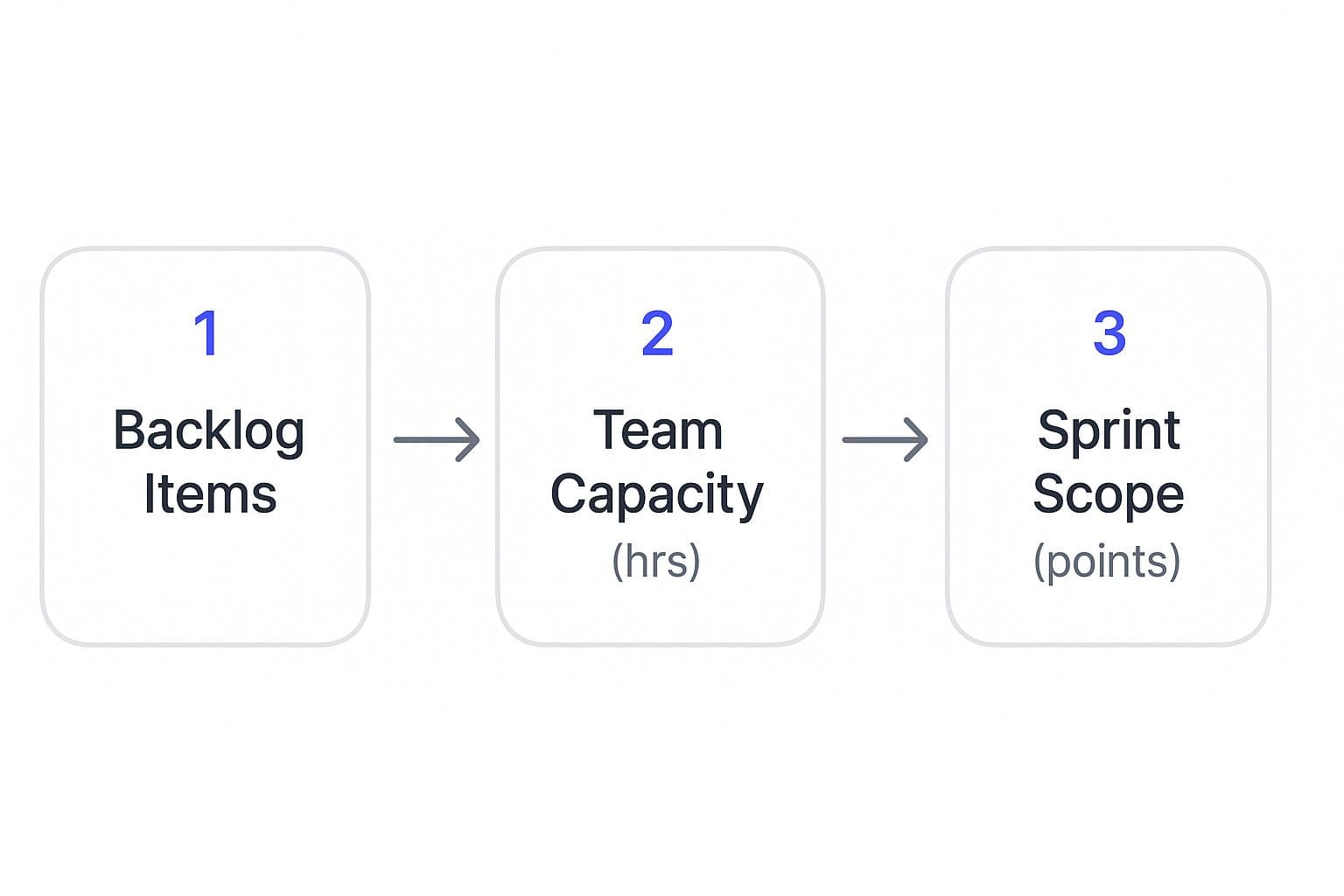
As you can see, the sprint scope should be a direct reflection of what needs doing, balanced against the real-world hours your team can provide.
Adding the Finishing Touches
To complete your first template, there are two more elements I always recommend including: an Impediment Log and a Definition of Done.
Finally, your Definition of Done (DoD) is a crucial checklist that spells out exactly what "complete" looks like for any given task. This creates a shared understanding of quality and prevents those end-of-sprint arguments about whether something is really finished.
How to Run a Sprint Planning Meeting That Works
Having a great agile sprint planning template is one thing, but making it work is all about the meeting itself. The real goal isn't just to assign tasks; it's to create a collaborative workshop where the entire team actually builds the sprint plan together. When you get this right, you turn a room of passive listeners into a team of active owners.
The meeting should always start with the Product Owner sharing the proposed sprint goal. Think of this as a conversation starter, not a final command. They need to explain the "why"—how this goal connects to the bigger product vision and what it means for the customer. This context is everything; it helps the team buy into the plan and make smarter trade-offs later on.
Get the Team Pulling from the Backlog
Once the goal is clear, all eyes turn to the product backlog. This is where your template becomes the central point of the conversation. Instead of the Product Owner just pushing items into the sprint, the development team needs to be the one pulling them in. They should be the ones selecting user stories that they agree will hit the sprint goal.
This "pull" dynamic is critical. It’s what keeps the workload realistic, based on the team's actual capacity and their shared understanding of what each task involves. As you discuss stories, encourage the team to ask questions and break down bigger items into smaller, concrete tasks right then and there. For startups, this intense collaboration is a huge part of successful custom software development for startups, as it ensures every hour is spent building the right thing.
Moving from Estimates to a Real Commitment
After you have a rough collection of user stories, it's time to estimate the effort. Most teams use story points for this, and the key is to keep it quick and consensus-driven. You're not looking for scientific precision, just a relative sense of size.
Once that's done, add up the points. How does that number stack up against the team's historical velocity and the capacity you’ve laid out in the template?
This is the reality check. If the workload looks too heavy, the team needs to negotiate with the Product Owner to swap or remove items. The meeting isn't over until everyone on the team agrees on the final sprint backlog and genuinely believes they can deliver it. That shared confidence is what turns a plan on a spreadsheet into a successful sprint.
Level Up Your Planning: Advanced Customizations for Experienced Teams
Once your team has the basics of sprint planning down and you're in a good rhythm, you'll start to notice the limitations of a standard template. Off-the-shelf templates are great for getting started, but experienced teams need more—they need a tool that doesn't just list tasks, but offers real insight.
This is where you move beyond a simple to-do list. The goal is to evolve your template from a static document into a dynamic dashboard that helps you answer the tough questions: "Are we on track?" and "What can we realistically commit to next?"
Weave in Data for Smarter Forecasting
One of the most powerful upgrades you can make is to bring key agile metrics right into your planning space. Instead of having them siloed in another tool, embed your velocity chart and burndown chart directly into the template.
A velocity chart is your team's performance history at a glance. It shows how many story points you've consistently completed in past sprints. This isn't just a vanity metric; it’s your secret weapon for accurate forecasting. With this historical data front and center, capacity planning stops being a guessing game and becomes a data-informed conversation. You can make commitments you can actually keep.
Then there's the burndown chart. Think of this as the sprint's real-time heartbeat. It plots the work remaining against the days left, giving you an immediate visual cue if things are going off the rails. Catching a deviation early means you can adjust course long before the end of the sprint, turning a potential failure into a learning opportunity.
Taming Cross-Team Dependencies
As you scale, you'll inevitably run into dependencies. Your project gets stuck waiting on another team, and suddenly your whole sprint is at risk. Most basic templates completely ignore this reality, leaving you to track these critical links on a spreadsheet or, worse, in your head.
The fix is surprisingly simple: add a dedicated Dependency Log to your template. This isn't just another list; it's a risk management tool. At a minimum, it should track:
- Your Blocked Task: The user story in your sprint that's on hold.
- The Other Team: Who you're waiting on to deliver.
- Their Task ID: The specific ticket or item you're tracking.
- Need-By Date: When you absolutely need their part to be done.
Putting this information right in your planning document forces the conversation. It brings these risks out into the open before the sprint starts, so you can coordinate with other teams proactively instead of scrambling when a deadline is missed. It's a small tweak that saves a world of frustration.
Many powerful tools bake this kind of thinking right in. Take the Atlassian Jira sprint planning template, for example. It’s not just a list; it’s a living workspace that connects your backlog, capacity, and goals. This is the kind of advanced setup that helps teams at NASA’s Jet Propulsion Laboratory manage mission-critical projects and allows Spotify to coordinate its famous 'squad' model. See for yourself how advanced sprint planning tools work at anotherwrapper.com.
As your team's needs evolve, so should your template. What starts as a simple checklist can become a sophisticated planning dashboard.
Evolving Your Template From Basic to Advanced
| Feature | Basic Implementation | Advanced Customization |
|---|---|---|
| Capacity Planning | Manually list team members' availability (e.g., vacation days). | Integrate a velocity chart to automatically suggest a story point target based on historical data. |
| Goal Setting | A simple text field for the Sprint Goal. | Link Sprint Goal directly to quarterly OKRs or strategic initiatives for clear alignment. |
| Risk Management | A "notes" section for potential issues. | A dedicated Dependency Log with fields for tracking external teams, tickets, and deadlines. |
| Progress Tracking | A static list of tasks to be checked off. | Embed a live burndown chart that visualizes work remaining vs. time. |
| Retrospective Actions | A separate document to list improvement items. | A dedicated section in the template to carry over the top 1-2 retrospective action items into the next sprint plan. |
Ultimately, the best template is one that grows with you, reflecting your team's unique process and helping you solve your most pressing challenges.
Common Sprint Planning Pitfalls and How to Dodge Them
Even the slickest agile sprint planning template can't save a team from a few classic blunders. I've seen them happen time and again, and they can easily derail a sprint. Think of this as your field guide to spotting these traps early and steering your team back on track.
One of the most common issues? Chronic overcommitment. Everyone’s optimistic, everyone wants to deliver, so the team says "yes" to a mountain of work that just isn't realistic. That early enthusiasm quickly sours into late nights, missed deadlines, and a serious hit to morale.
The fix is surprisingly simple, but it demands discipline: trust your data. Your template should be tracking your team's velocity—the average amount of work (in story points) you actually complete each sprint. This isn't just a number for a report; it's your anchor to reality. If your team consistently knocks out 30 story points, don't commit to 45. It's just not going to happen.
The Problem of Rushed Refinement
Another landmine is inaccurate estimation, which almost always comes from a rushed or non-existent backlog refinement. When user stories are fuzzy, poorly defined, or way too big, your team's estimates are just educated guesses. This is what happens when refinement is treated like a chore instead of the crucial team ritual it is.
The solution is to make backlog refinement a non-negotiable, recurring meeting. This is your dedicated time to break down those giant epics, hash out acceptance criteria, and get every story truly "sprint-ready." A healthy, well-groomed backlog is the best defense you have against wild sprint forecasts and that dreaded mid-sprint scope creep.
When Collaboration Turns into Dictation
I've also seen a more subtle pitfall: the Product Owner dictates the sprint work instead of collaborating with the team. They might walk into planning with a pre-filled list of tasks, effectively turning the session into a one-way assignment meeting. This completely torpedoes the team's autonomy and ignores their expertise.
A sprint plan has to be a genuine negotiation. It’s a dialogue between what the business needs (the Product Owner) and what the team can realistically build (the Development Team). The best way to do this is to have the team pull work from the backlog to meet the sprint goal, rather than having it pushed onto them.
- Foster Open Dialogue: Create a safe space where developers can question estimates or challenge scope without fear of reprisal.
- Focus on the Goal: The Product Owner owns the "what" and the "why" (the sprint goal). The team owns the "how" (the specific tasks they'll do to meet that goal).
- Protect the Process: This is a key job for the Scrum Master. They must protect this collaborative space and gently guide the conversation away from top-down commands.
Ultimately, these challenges often point to deeper organizational issues. It’s no surprise that over 40% of organizations say company culture is a major barrier to agile adoption. But for those who clear that hurdle, the results speak for themselves: sprint planning improves prioritization for 76% of marketing teams and boosts productivity for 73%. You can dig into more stats about overcoming these agile adoption barriers at parabol.co.
Another piece of the puzzle is getting the initial scope right from the start. You can learn more about how to define project scope in our detailed guide.
Got Questions About Agile Sprint Planning? We've Got Answers.
Even with a killer sprint planning template, you're going to have questions. It's just part of the deal. Trying to figure out the perfect sprint length, what to do when fires pop up, and who's really in charge of what—it’s all part of the agile journey.
Let's cut through the noise. Here are some straightforward, practical answers to the questions we see teams wrestling with all the time.
What’s the Ideal Length for a Sprint?
If you ask ten different teams, you might get ten different answers, but most of them will land on two weeks. There's a reason it's so popular: it’s the sweet spot. Two weeks is just short enough to stay agile and get quick feedback, but it’s also long enough to actually build and deliver something meaningful.
Of course, this isn't a one-size-fits-all rule. I've seen some high-octane teams thrive on one-week sprints, especially in environments where things change daily. On the flip side, teams working on deep, complex problems might need three or even four weeks to get traction.
The real secret sauce here is consistency. Pick a length and stick with it. This creates a reliable rhythm for the team and makes your velocity a genuinely useful metric for forecasting, not just a shot in the dark.
How Should We Handle Unplanned Work or Bugs?
Ah, the dreaded scope creep. Let's be honest, unexpected work isn't an "if," it's a "when." The best way to handle it is to plan for it. Don't leave your sprint capacity packed to 100%.
A smart move is to build a buffer right into your sprint. We often recommend setting aside a small chunk of your team's capacity—maybe 10-15%—just for those urgent bugs or surprise tasks that always seem to materialize out of thin air.
When a critical issue does pop up, it’s time for a quick huddle. The Product Owner and the team need to decide how urgent it really is. If it's a "drop everything" situation, you'll likely need to swap out a lower-priority story from the sprint. This keeps the team focused and prevents burnout.
Can Non-Software Teams Use This Template?
Absolutely. Agile might have been born in the world of software, but its core ideas are incredibly powerful for any team trying to manage complex work. We’ve seen marketing, HR, design, and even legal teams adopt sprint planning to bring focus and clarity to their projects.
You just need to tweak the lingo to fit your world. For example:
- A marketing team's "user story" might be, "Launch the social media campaign for the Q3 product release."
- A design team's "Definition of Done" could include things like peer review, brand guideline checks, and exporting assets in the right formats.
The template's structure—setting goals, breaking down work, and tracking progress—is universal. It’s all about iterative delivery, no matter what you're delivering.
Who Actually Owns the Sprint Planning Template?
This is a classic question. Often, the Scrum Master or team lead is the one who sets up the template initially. But from that point on, it’s a shared team responsibility.
Think of the template not as some report for management, but as the team's collective game plan. Everyone fills it out together during the planning session. Throughout the sprint, it's on each person to keep their tasks updated. When everyone feels a sense of ownership, the template transforms from a simple document into a powerful tool for alignment and success.
Ready to turn your idea into a market-ready product? At Iglu Digital, we specialize in building high-quality MVPs with speed and precision. Start building your vision today.