

Decoding the Cost of Developing Software

Table of Contents
Trying to pin down the exact cost of a software project is a lot like asking, "How much does it cost to build a house?" There's no single answer. The final price tag could be 25,000** for a simple starter home or well over **200,000 for a sprawling custom estate with all the bells and whistles.
It all comes down to the blueprint, the materials you choose, and the experience of the crew you bring on board.
Demystifying The Price Tag On Your Software Idea

Anyone who gives you a flat price for "software" without knowing the details is selling you something. A basic sedan and a high-performance sports car both get you from A to B, but the engineering, features, and cost are worlds apart. It's the same in software. A simple Minimum Viable Product (MVP) built to test one core idea is a completely different beast from a massive, feature-rich platform designed to handle millions of users.
This guide will serve as your roadmap. We’re going to peel back the layers and move beyond vague estimates to look at the specific factors that can add—or subtract—zeroes from your final invoice. Getting a handle on these drivers is the first and most critical step to setting a realistic budget and making smart decisions for your project.
To give you a clearer picture right from the start, let's look at some typical project scopes and their associated cost ranges.
Estimated Software Cost Ranges by Project Type
| Project Type | Typical Complexity | Estimated Cost Range |
|---|---|---|
| Basic Application | A simple app with 3-4 core features, standard UI, and no complex integrations. Think informational apps or single-function tools. | 25,000 - 75,000 |
| Mid-Level Software | A more robust application with custom UI/UX, user profiles, API integrations, and moderate backend processing. | 75,000 - 150,000 |
| Complex Enterprise System | A large-scale platform with advanced features like real-time data processing, third-party service integrations, and high security. | 150,000 - 300,000+ |
These numbers are just a starting point, of course. The real cost is shaped by a handful of key variables that every project has in common.
Key Factors That Shape Your Budget
Every software project is a unique puzzle, but the pieces that determine its final cost are surprisingly consistent. Here are the big ones you need to get your head around:
- Project Scope and Complexity: This is the heavyweight champion of cost factors. An informational website is one thing; an e-commerce platform with secure payment gateways, user accounts, and real-time inventory management is another animal entirely. The more features you add, the more it costs.
- Team Composition and Location: Who is building your software, and where are they located? The size of your team, the seniority of your developers, and their geographic location will dramatically impact hourly rates and the overall budget.
- The Technology Stack: The programming languages, frameworks, and third-party services you choose have real financial implications. Some technologies speed up development, while others might come with ongoing licensing fees or require more specialized (and expensive) developers.
By getting a firm grasp on these core drivers, you'll be in a much better position to navigate the complexities of budgeting. To see how these elements come together in a real-world estimate, check out our comprehensive guide for a deeper dive into calculating software development costs. It’s packed with details to help you understand where your money is going and how to spend it wisely.
Breaking Down the Core Cost Drivers

Trying to understand the cost of developing software without breaking it down is like looking at a car's sticker price without knowing what's under the hood. The final number is a sum of its parts, and each part can dramatically change the total.
Think of it like a recipe. The final dish depends entirely on the ingredients you choose. In software, these "ingredients" are Project Complexity, UI/UX Design, the Technology Stack, and your Team Composition. Nail these down, and you're well on your way to a realistic budget.
Project Complexity and Scope
This is the big one. It's the single most significant factor that will drive your costs up or down. The more features you want, and the more intricate they are, the more hours, brainpower, and resources you'll need.
It’s a bit like building with LEGOs. A simple scheduling app is like a small, basic car model from a kit. You have a handful of standard bricks and a single page of instructions to build core functions—creating an event, setting a reminder, viewing a calendar. The path is clear and predictable.
But what if you want to build an AI-powered logistics platform? That’s like building a life-sized, functional LEGO Bugatti. You’ll need thousands of specialized pieces, complex gearing, and a manual the size of a phone book. This platform has to juggle real-time tracking data, talk to multiple third-party APIs, and use machine learning to predict delivery times. Each of those “specialized pieces” adds layers of development and testing, sending the cost upward.
The Role of UI UX Design
How your software looks and feels—the User Interface (UI) and User Experience (UX)—isn't just window dressing. It's about crafting an intuitive and satisfying journey for the user, and the level of polish here is a huge cost variable.
You can think about it in two ways:
- Template-Based Design: This is like buying a suit off the rack. It’s functional, uses standard layouts and common navigation, and gets the job done quickly. It's incredibly cost-effective because it doesn't require a ton of custom design work.
- Custom-Animated Experience: This is getting a bespoke, tailored suit. Every element is crafted from the ground up with custom illustrations, fluid animations, and unique micro-interactions. This level of detail creates a truly memorable experience but requires serious time from senior designers and the front-end developers who have to bring those complex visuals to life.
A clean, simple interface can be incredibly effective and keep your budget in check. But for apps that need to win over consumers, that unique design can be a worthwhile investment, even if it bumps up the initial cost of developing software.
Your Chosen Technology Stack
The "tech stack" is simply the set of tools your team uses to build the software—the programming languages, frameworks, and databases. The choices you make here are like picking an engine for a car; they have both immediate and long-term cost implications.
Some technologies are like a reliable, fuel-efficient sedan engine. Open-source tools like React, Node.js, and Python are free to use, backed by massive communities, and have a huge pool of developers who know how to use them. This makes hiring easier and usually more affordable.
Other projects might need a high-performance, specialized engine. This could mean licensed enterprise software or niche programming languages that come with hefty subscription fees. These tools might offer incredible capabilities, but they require developers with rare—and therefore more expensive—skill sets.
Your tech stack doesn't just affect the initial build. It also influences your long-term maintenance costs and how easily your product can grow.
Team Composition and Size
At the end of the day, people build software, and the team you assemble is a primary cost driver. The size of your team, the seniority of its members, and its overall structure all feed directly into your budget. You’re not just paying for someone to write code; you're paying for their experience and problem-solving skills.
A lean team for a small project might just be a project manager, a designer, and a couple of developers. But a larger, more complex build could easily require a team of ten or more, including:
- Senior and Junior Developers
- A dedicated QA Engineer
- A DevOps Specialist
- A UI/UX Designer
- A Business Analyst
- A Project Manager
Senior developers command higher salaries, but they often work much faster and produce more reliable code, which can actually save you money by avoiding costly mistakes down the road. For most complex projects, a balanced team with a mix of senior and mid-level talent often hits the sweet spot of cost and effectiveness. The more hands on deck, and the more experienced they are, the higher your bill will be.
How Team Location Shapes Your Budget
When you’re trying to budget for a new software project, one of the biggest cost drivers has nothing to do with code or features. It's about where your development team sits. A pin on a map can have a massive impact on your final bill.
Think about it like this: a skilled developer in San Francisco and an equally skilled developer in Poland might produce the same quality of work, but their hourly rates are worlds apart. That’s because local economies, cost of living, and market demand for talent create huge price differences. This is why getting familiar with your sourcing options—onshore, nearshore, and offshore—is one of the smartest first steps you can take.
Onshore, Nearshore, and Offshore: What's the Difference?
These terms simply describe where your development team is in relation to your own business. Each comes with its own set of trade-offs between cost, communication, and convenience.
- Onshore (Local): Your team is in the same country you are. Communication is a breeze, and you’re perfectly aligned on culture. The downside? It’s by far the most expensive option.
- Nearshore: Your team is in a nearby country, usually in a similar time zone. This is often the sweet spot, offering a great balance between cost savings and easy collaboration.
- Offshore: Your team is on the other side of the world, likely in a completely different time zone. This model offers the biggest cost savings but demands excellent project management to handle the time and cultural gaps.
The goal isn't just to find the cheapest team. It's about finding the right fit for your project. If you need constant, back-and-forth collaboration all day, an onshore or nearshore team is probably your best bet. But if your project is well-defined with clear goals, an offshore partner can be incredibly cost-effective.
A Global Tour of Developer Rates
Just how different are the costs? The numbers don't lie.
In 2025, you could see large enterprise firms in places like New York or London charging 400** or more per hour, with some even pushing past **900. Mid-sized agencies usually land between 120 and 250 per hour, while smaller local shops might charge 90 to 160.
Then you look at offshore and nearshore companies, where rates often fall between 27 and 82 per hour. The difference is staggering, and it’s all thanks to lower operational costs in those regions. You can dig into a more detailed software development pricing guide to see a full comparison.
To give you a clearer picture, here’s a breakdown of what you can expect to pay for developers in different parts of the world.
Average Software Developer Hourly Rates by Global Region
The table below shows just how much rates can vary based on where your team is located. It’s not just about cost; each region brings unique advantages to the table.
| Region | Average Hourly Rate (Junior Developer) | Average Hourly Rate (Senior Developer) | Primary Benefits |
|---|---|---|---|
| North America | 70 - 130 | 150 - 250+ | No time zone issues, perfect cultural alignment, huge talent pool. |
| Western Europe | 60 - 110 | 100 - 180 | Top-tier engineering talent and robust data privacy laws (GDPR). |
| Eastern Europe | 35 - 60 | 50 - 95 | Strong technical schools, great work ethic, some time zone overlap. |
| Latin America | 35 - 65 | 50 - 100 | Excellent time zone alignment with the US, growing tech scene. |
| Asia | 25 - 50 | 30 - 75 | The largest global talent pool and the most competitive pricing. |
As you can see, simply expanding your search beyond your city or country can unlock massive savings, potentially cutting your development budget by 50-70%.
The image below gives a sense of how different estimation techniques hold up when it comes to accuracy—a critical piece of the puzzle when you're trying to keep your project on budget.
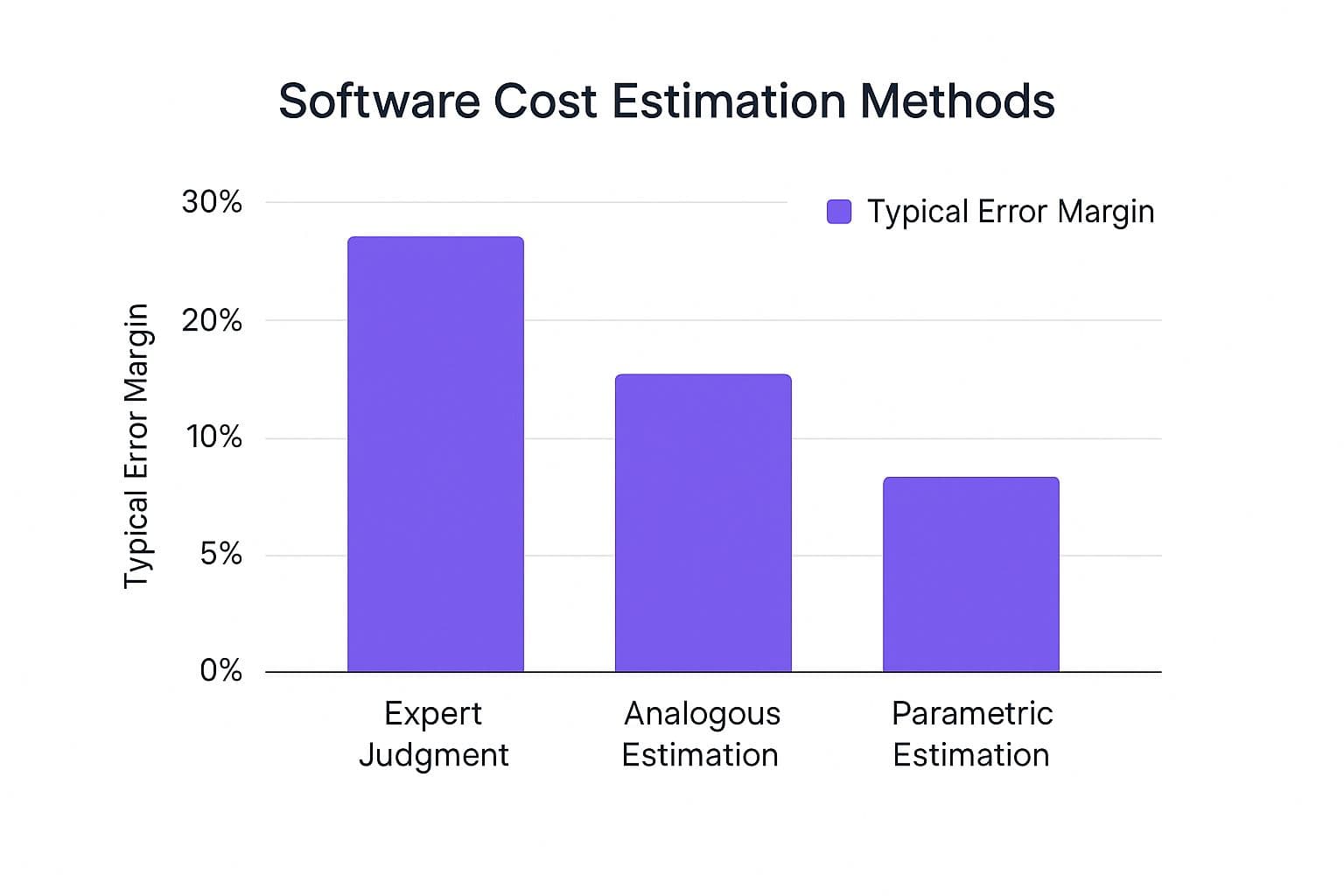
It’s a good reminder that the methods you use to forecast costs are just as important as the rates you pay.
It's About More Than Just the Hourly Rate
While a lower price tag is tempting, it’s not the whole story. A successful partnership is built on more than just saving money.
Before you make a call, think through these key factors:
- Time Zone Overlap: How much real-time interaction do you actually need? A few hours of overlap might be all you need for daily check-ins. A twelve-hour difference, however, means you’ll need to master asynchronous communication.
- Cultural and Language Nuances: Communication breakdowns are project killers. Make sure any potential partner has a strong command of English and a professional culture that meshes with yours. Otherwise, you’ll waste time and money on rework caused by simple misunderstandings.
- Technical Expertise: Don't fall into the trap of thinking lower rates mean lower quality. Regions like Eastern Europe and Latin America are pumping out seriously talented engineers. The trick is to vet them with the same rigor you’d use for a local agency.
At the end of the day, geography is one of the most powerful levers you have for controlling the cost of developing software. By thoughtfully weighing the trade-offs, you can build an amazing global team that delivers incredible work without draining your bank account.
Choosing the Right Pricing Model
Once you have a handle on the project's scope, team, and tech, the next big question is how you're going to pay for it all. The way a development agency bills you isn't just a minor detail—it fundamentally changes how flexible, predictable, and manageable your project will be. Getting this right is about aligning the financial structure with your project's reality.
It’s a bit like deciding how to pay for a major home renovation. You wouldn't use the same payment plan for a quick paint job that you would for a custom-built extension where surprises are almost guaranteed. In software, the best model really depends on how clear the blueprint is from day one.
The Fixed Price Model: A Predictable Path
The Fixed Price model is exactly what it says on the tin: one price for one, clearly defined scope of work. It’s the software equivalent of ordering a set meal at a restaurant. You know what you’re getting—the appetizer, the main, the dessert—and you know exactly what the bill will be before you even sit down.
This approach is perfect for projects where the requirements are set in stone and documented down to the last detail. If you can map out every feature, screen, and user flow with absolute clarity, a fixed price gives you complete budget certainty.
But that predictability comes at a cost: rigidity. If you get halfway through and decide you want to swap the main course or add a side dish, the whole arrangement has to be re-evaluated. Any change from the original plan, often called "scope creep," means a new contract or a change order, which adds both time and money.
The Time and Materials Model: Flexibility First
On the other end of the spectrum is the Time & Materials (T&M) model. Think of this as paying your renovation contractor by the hour. You pay for the actual time the team spends working on your project, plus the cost of any tools or "materials" they need. It’s all about flexibility.
This model shines for complex, long-term projects where the final destination isn't fully mapped out from the start. Maybe you uncover a new user need during testing or need to react quickly to a competitor's latest feature. T&M lets you make those calls without grinding everything to a halt for contract renegotiations. You get to steer the project as it moves forward.
The trade-off? You lose that upfront budget certainty. While you gain total control over the project's direction, the final bill isn't known until the work is finished. This model hinges on a deep sense of trust and transparent communication with your development partner to make sure hours are logged fairly and the project stays on a productive path.
For a deeper dive, check out our guide comparing the Time & Material vs. Fixed Price models.
The Dedicated Team Model: An Extension of Your Company
Finally, we have the Dedicated Team model. This isn't really about paying for a project; it's about retaining an entire team for a set period. It’s like having your own expert software crew on a long-term retainer, but without the HR headaches and overhead of direct hiring.
You pay a consistent monthly fee for a team of developers, designers, and project managers who work only for you. This approach is a game-changer for established companies or well-funded startups that need continuous, ongoing development work.
You get the stability and deep product knowledge of an in-house team combined with the agility of an external partner. Over time, this team becomes an integral part of your company, understanding your business goals and contributing strategically. It’s a powerful setup for anyone serious about scaling their software and maintaining a competitive edge.
Smart Strategies to Control Your Spending

Knowing what drives the cost of developing software is a great start, but actively managing those costs is where you win the game. The good news is there are several proven strategies to keep your budget in check without sacrificing the quality of your final product. It all comes down to making smarter, more deliberate choices right from the beginning.
The single most effective strategy? Start small. Build a Minimum Viable Product (MVP). Think of an MVP as the leanest version of your idea that solves a core problem for your first users. It’s not about releasing something that’s broken or incomplete; it’s about launching something focused and functional to test your biggest assumptions in the real world.
By getting an MVP into the hands of actual users, you can gather invaluable feedback and hard data before pouring money into a full-scale build. This lets you confirm that people actually want what you’re building and helps you avoid spending a fortune on features that sound great on paper but nobody ends up using.
Prioritize Features with Precision
With an MVP mindset in place, the next challenge is deciding what features actually make it into that first version. This calls for some ruthless prioritization. One of the best frameworks for this is the MoSCoW method, which helps you sort every potential feature into one of four clear categories:
- Must-Haves: These are the absolute, non-negotiable functions. If these aren't in the product, it simply doesn’t work.
- Should-Haves: These are important features that add a ton of value but aren't strictly necessary for the initial launch.
- Could-Haves: Think of these as the "nice-to-haves." They're desirable enhancements you can circle back to if you have the time and budget.
- Won't-Haves: These are features you’ve explicitly decided not to build in this phase.
This simple exercise forces you and your team to have critical conversations about what's truly essential. It gives you a clear roadmap, keeps everyone focused, and prevents the project from getting bogged down by complexity. Unchecked feature additions are one of the biggest budget killers out there, and it's critical to understand how to avoid scope creep to keep your project on track.
Leverage Open-Source and Strategic Outsourcing
Another powerful way to keep spending down is to be smart about your technology and talent. Instead of building everything from the ground up or buying expensive software licenses, you can often turn to open-source technologies. These are high-quality, community-vetted tools that are free to use, which can slash your upfront costs.
On the talent side, strategic outsourcing opens up a global pool of skilled developers, often at a fraction of what it costs to hire locally. The software development outsourcing market is expected to hit $151.9 billion by 2025 for a reason—companies are tapping into it for cost savings and access to specialized expertise. This allows you to assemble a top-tier team without the massive overhead of traditional in-house staff.
By combining an MVP launch with disciplined feature prioritization and smart resourcing, you can dramatically lower the cost of developing software and seriously boost your odds of success.
Your Questions About Software Costs, Answered
Even after breaking down all the moving parts, it's natural to still have questions when you're trying to nail down the cost of developing software. Let's tackle some of the most common ones we hear from founders and business leaders.
The goal here is to clear up any lingering confusion and give you the confidence to build a budget that actually works. Think of this as a final sanity check before you start talking to development partners.
What's a Realistic Cost for a Simple App?
First off, "simple" can mean very different things to different people. One person's basic tool is another's complex project. But if we're talking about a straightforward Minimum Viable Product (MVP) with just a few core features, a clean interface, and built for a single platform (like the web or iOS), you're generally looking at a range of 25,000 to 60,000.
That price tag usually covers a small, dedicated team working for about two to four months. An app that lets users sign up, save some basic data, and interact with a few simple screens would fit squarely in this bracket.
But remember, that's just a starting point. The moment you decide to add features like payment processing, connect to third-party services, or build in real-time chat, you’ll see the cost climb. Every new piece of functionality adds more hours and complexity to the build.
Are There Hidden Costs I Should Plan For?
Yes, and this is a big one. The initial development cost is just the price of admission. One of the most common and dangerous budgeting mistakes is forgetting about all the expenses that come after your app goes live.
Ignoring these ongoing costs can put your entire project in jeopardy down the road. You absolutely have to plan for them to keep your software running, secure, and relevant.
Here are the usual suspects to factor into your total cost of ownership:
- Third-Party Service Fees: These are the recurring bills that keep the lights on. Think server hosting from providers like AWS or Google Cloud, transaction fees from payment gateways like Stripe, and monthly subscriptions for any APIs your app depends on.
- Maintenance and Support: This is non-negotiable. A good rule of thumb is to budget 15-20% of your initial development cost per year for maintenance. This covers bug fixes, security patches, and crucial updates to keep up with new operating systems.
- App Store Fees: Building a mobile app? Apple and Google both charge annual developer fees. They also take a cut of every sale or subscription made through their stores.
- Marketing and User Acquisition: You built it, but will they come? This budget covers everything from paid ads to content marketing—whatever it takes to get your product in front of the right people.
- Future Upgrades: Your launch version is just V1. Adding a major new feature or overhauling the user experience is a whole new mini-project with its own price tag.
How Do I Get an Accurate Cost Estimate for My Idea?
To get a truly reliable estimate, you have to do some homework first. You need to hand potential development partners a detailed project specification document. The quality of your brief has a direct and massive impact on the accuracy of the quotes you'll get back.
Think of it like a blueprint for a house. The more detail you provide, the better an agency can understand what you want and how much work it will take. A fuzzy idea will always get you a fuzzy—and probably wrong—price.
Your spec document should clearly lay out:
- Project Goals: What problem are you solving? What's the main point of this software?
- Target Audience: Who is this for? Knowing the end-user shapes countless decisions.
- A Full Feature List: Write down every single thing the software needs to do. A great way to do this is with "user stories" (e.g., "As a customer, I want to save items to a wishlist so I can buy them later").
- Platform Requirements: Is this for the web? iOS? Android? All of them?
- Design and UX Ideas: Got any wireframes, mockups, or even just links to other apps you like? Include them.
Once you have this document, send it to a few different development agencies. They'll use it to create a proper proposal that breaks down the estimated hours for design, coding, testing, and management. Comparing these detailed breakdowns is the single best way to understand the real cost of developing software and choose the right team for the job.
Ready to turn your idea into a tangible product without the guesswork? At Iglu Digital, we specialize in building market-ready MVPs for a price fixed up front, giving you the speed and clarity you need to launch with confidence. Get your ready-to-launch MVP here.