

How to Conduct Usability Testing: A Practical Step-by-Step Guide
Table of Contents
Usability testing isn't just about watching people click around on your app. It’s a structured investigation designed to uncover exactly where your product shines and where it causes headaches. At its heart, you're trying to get honest, unfiltered feedback by observing real people trying to accomplish real tasks.
Building a Foundation for Effective User Tests
The most valuable user tests I've ever run didn't start the moment a participant sat down. They started weeks earlier, with a solid plan. Without clear goals, you’re just gathering random opinions, not actionable data that can drive design decisions.
You have to translate vague business goals into something tangible you can actually test. For example, a goal like "increase user engagement" is useless for a test. A better, testable question is, "Can a first-time user create a project and invite a teammate in under two minutes?" See the difference? One is a wish; the other is a hypothesis you can prove or disprove.
This initial planning phase is non-negotiable. It dictates who you need to recruit, what you'll ask them to do, and what "success" even looks like. Your approach will also change depending on where you are in the product lifecycle. An early-stage MVP screams for moderated, qualitative tests where you can dig into the why behind a user’s confusion. A more mature product might be better served by unmoderated, quantitative tests to measure task completion rates across hundreds of users.
Putting in the work upfront ensures every minute of your test is focused and productive. This visual breaks down the core components of that planning process.
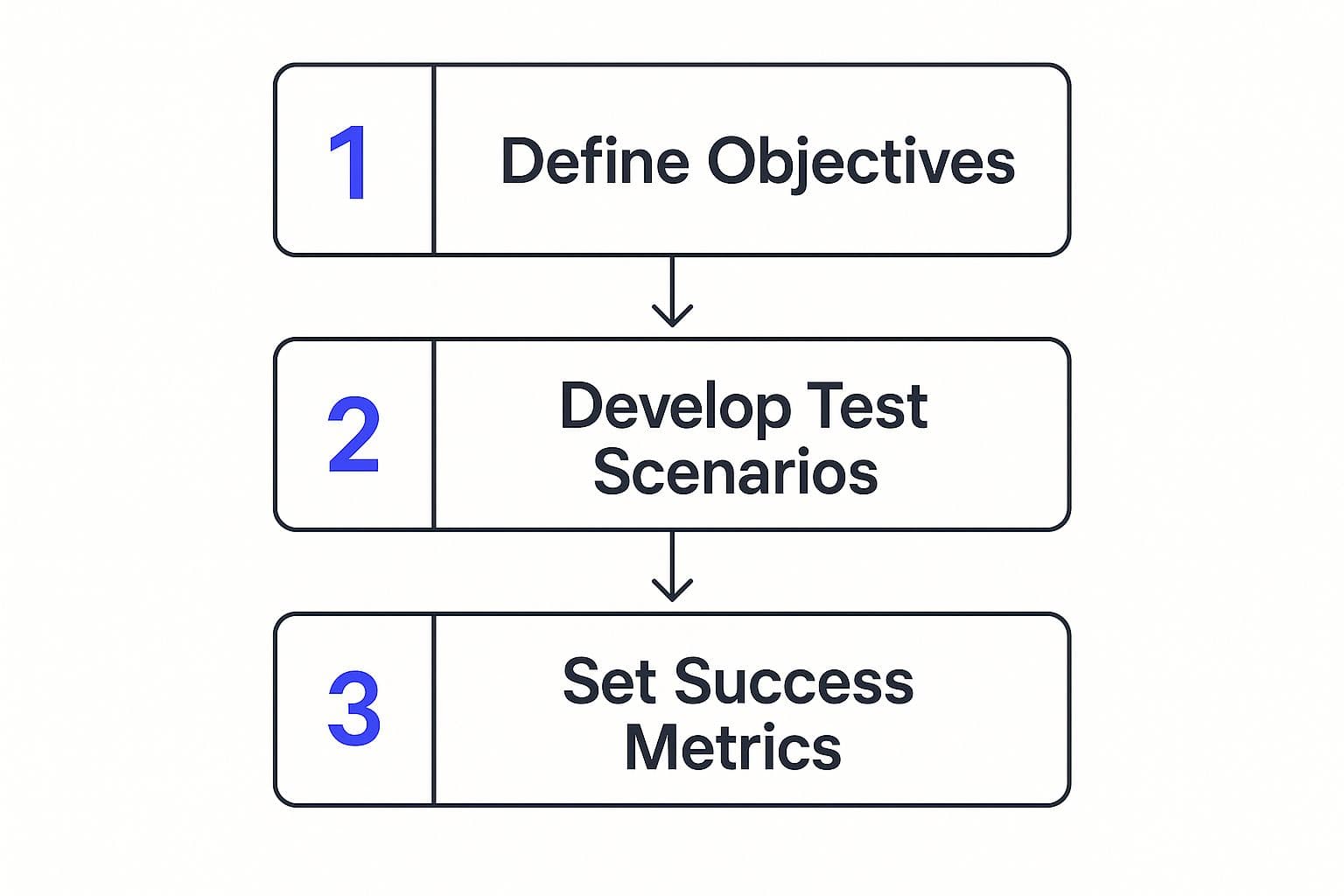
When you map out your objectives, tasks, and metrics like this, you create a direct line from your biggest questions to measurable answers. It’s what transforms a casual chat into a powerful diagnostic tool for your product.
Choosing the Right Testing Method
Deciding between moderated, unmoderated, remote, or in-person testing is a strategic choice. Each method comes with its own trade-offs in terms of budget, timeline, and the kind of feedback you'll get. There’s no single "best" option—only the one that’s right for your current needs.
Here are a couple of the most common approaches:
- Moderated Testing: This is where a facilitator guides a participant through the test. It's fantastic for digging into complex workflows because you can ask follow-up questions in the moment. When a user hesitates, you can ask, "What were you expecting to see there?" This gives you rich, qualitative insights into their thought process.
- Unmoderated Testing: Here, participants complete tasks on their own, usually with the help of a platform like UserTesting or Maze. It's much faster and more affordable, making it perfect for validating simple tasks or collecting quantitative data from a larger, more diverse audience.
The formalization of these methods is big business. In 2024, the global market for usability testing tools hit an estimated USD 1.28 billion. That number is expected to climb to USD 6.55 billion by 2033, which shows just how seriously companies are taking structured user feedback. You can dig into the usability testing market trends on Business Research Insights if you're curious.
The table below breaks down the common methods to help you decide which one fits your project's goals and constraints.
Choosing Your Usability Testing Method
| Method Type | Best For | Key Advantage | Potential Drawback |
|---|---|---|---|
| Moderated (In-Person) | Deeply understanding user behavior, emotions, and motivations in a controlled environment. | Richest qualitative data; allows for observation of body language. | Expensive, time-consuming, and geographically limited. |
| Moderated (Remote) | Exploring complex tasks and gathering in-depth feedback with geographically diverse participants. | More flexible and cost-effective than in-person; still allows for direct interaction. | Lacks the nuance of in-person body language; tech issues can disrupt sessions. |
| Unmoderated (Remote) | Gathering large-scale quantitative data, testing simple tasks, and getting quick feedback. | Fast, affordable, and provides data from a large number of users. | No opportunity for follow-up questions; lacks context on why users fail. |
| A/B Testing | Comparing two or more versions of a design to see which one performs better on a specific metric (e.g., clicks). | Provides definitive, quantitative evidence for a specific design choice. | Doesn't explain user behavior; only shows what happened, not why. |
Ultimately, picking the right method comes down to aligning it with your research goals.
Finding People Who Reflect Your Real Users
Let's be blunt: your usability test is only as good as the people you test with. Recruiting participants who actually represent your target audience isn’t just a step—it's the foundation of the whole process. Get this part wrong, and you'll end up solving problems that nobody actually has.
It’s tempting to grab friends, family, or your colleagues for a quick run-through. Resist that urge. They are too close to you and your project to give the brutally honest, unbiased feedback you desperately need. You’re looking for people who mirror your real customers in their goals, their comfort level with technology, and their everyday behaviors. This is where a sharp, well-written screener survey becomes your most powerful tool.
A great screener goes way beyond basic demographics. It’s a filter for very specific attitudes and actions. For example, say you're testing a new feature for a project management tool. You don't just want "project managers." You need project managers who are actively using a competitor's software and have recently expressed frustration with resource allocation. See the difference? That’s the specific pain point you’re trying to solve.
Where to Find Your Ideal Participants
Once you have a crystal-clear picture of who you're looking for, the next question is where to find them. The best approach is to mix and match recruitment channels to get a diverse, representative sample. Sourcing participants is a skill in itself, and you can see how it fits into the broader strategy in our complete guide on how to conduct user research.
Here are a few of my go-to sources for finding quality participants:
- Recruiting Services: Platforms like User Interviews, Respondent, and UserTesting are built for this. They maintain huge pools of pre-screened people and let you filter by incredibly detailed criteria, which can save you a ton of time.
- Your Own Customer List: If you already have a product out in the wild, your existing users are pure gold. A simple email campaign offering a small incentive for their feedback can bring in amazing insights from people who are already invested in what you do.
- Niche Online Communities: Go where your users live online. This could be a Subreddit for a specific profession (like r/sysadmin), a Slack community for a particular industry, or a Facebook group dedicated to a shared interest or hobby.
Setting Fair and Motivating Incentives
Finally, you have to compensate people for their time. This isn't a bribe—it's a sign of respect for their time and the value of their feedback. The incentive should feel fair for the time they’re giving you and the complexity of the tasks you’re asking them to perform.
As a general rule, an industry standard is around 60-100 for a 60-minute moderated session. That number climbs quickly for highly specialized professionals like doctors, lawyers, or senior software engineers. The goal is to offer an amount that feels like a fair exchange of value. This motivates the right people to show up without the payment being so large that they feel pressured to only say nice things.
Designing Test Scenarios That Reveal Truths
A great usability test looks and feels like a relaxed, free-flowing conversation. But don't be fooled—the best sessions are guided by a carefully crafted script that’s designed to pull out honest, unfiltered feedback. Without a solid plan, it’s all too easy to wander off track or, worse, accidentally lead the participant to give you the answers you want to hear.
Your script should always start by setting the stage. Your first job is to build rapport and make the person feel comfortable. I always start by reminding them that we are the ones being tested, not them. It’s crucial to stress that there are no right or wrong answers; their blunt, even critical, feedback is the most valuable thing they can give us.
When people feel at ease, they're much more likely to think aloud, giving you a real-time window into their thought process. A relaxed participant is a truthful participant.
Crafting Realistic Task Scenarios
Once you've broken the ice, it’s time to get to the core of the test: the task scenarios. This is where so many teams stumble. They give overly specific instructions like, "Now click the blue button to add a new project," which tells you absolutely nothing about whether a real user could find that button on their own.
Instead, frame your tasks as mini-stories. Give them a goal rooted in a real-world problem, but don't tell them how to solve it.
Task Scenario Examples
| Weak Instruction (Avoid) | Strong Scenario (Use) | Why It Works |
|---|---|---|
| "Add an item to your shopping cart." | "Imagine you're planning a party and need to buy decorations. Find a set of balloons and add them to your cart." | This creates a realistic goal. It forces the user to navigate and search just as they would in real life, testing the entire journey. |
| "Sign up for our newsletter." | "You've heard good things about our weekly tips. Show me how you would make sure you receive them in your email." | This approach tests whether the newsletter signup is even discoverable and appealing, without giving away its location. |
The best scenarios encourage natural exploration. You get to see how users approach the problem, what they look for first, and where they get stuck. This is essential for understanding how to conduct usability testing that delivers real value.
The Art of the Follow-Up Question
As the participant works through your scenarios, your follow-up questions are what will elevate simple observations into deep, actionable insights. The trick is to ask open-ended questions that probe the "why" behind their actions without influencing their answers.
A leading question like, "Was that easy?" just pressures the user to be polite and agree. A much better way to phrase it is, "How did that compare to what you expected?" This neutral framing opens the door for a more detailed and honest response.
Here are a few powerful, non-leading follow-ups I always keep ready:
- "What are your first impressions of this page?"
- "Walk me through what you're thinking right now."
- "After you clicked that, what were you hoping to see?"
- "On a scale of 1 to 5, how difficult was that for you? Can you tell me more about why you chose that number?"
Mastering the subtle art of scenario design and neutral questioning is what separates a basic test from one that truly uncovers the truth about your product's user experience.
Mastering the Art of Session Moderation

Running a live usability test is less of a science and more of an art. It's a delicate dance where you have to be a quiet observer, a gentle guide, and a sharp psychologist, all at the same time. Your main job is to create a space where the participant feels comfortable enough to be brutally honest. That's how you get the authentic, unfiltered feedback you're after.
The secret to great moderation lies in the "think-aloud" protocol. Right from the get-go, you need to explicitly ask the participant to voice their thought process. I usually kick things off by saying something like, "As you work through this, please try to speak your thoughts out loud. If you're reading something, read it aloud. If you get confused, tell me what's confusing. This really helps us get inside your head."
Constant, gentle encouragement is your best friend here. If a participant falls silent, a simple, neutral prompt like, "What are you seeing on this screen?" or "What's going through your mind right now?" can get them talking again without steering them. The goal is to watch their natural behavior—to catch every hint of hesitation, every moment of confusion, and every flash of delight.
Handling Common Session Challenges
No matter how perfect your script is, sessions can still go sideways. Knowing how to handle the inevitable hiccups is what separates a good moderator from a great one. You have to be ready for those awkward moments when someone gets stuck, goes completely quiet, or flat-out asks for help.
Here’s my advice for navigating those situations:
- When a participant asks for help: Resist the urge to give them the answer. I know it's tempting, but their struggle is a goldmine of data! Instead, turn it back on them with a question like, "What would you try if I weren't here?" or "Where would you typically look for that?" This reveals so much about their expectations.
- When a participant gets completely stuck: Let them struggle for a bit. Watching how they try to solve the problem is incredibly insightful. If they start getting genuinely frustrated, you can step in. Say something like, "This is really helpful for us to see. In the interest of time, let's move on to the next task." Then, make a huge note of that critical failure.
- When a participant blames themselves: If you hear, "Oh, I'm so terrible at this," you have to jump in and reassure them immediately. A quick, "You're not the one being tested; our product is. There are no wrong answers here," can make all the difference.
With remote testing becoming the norm, especially in Europe, these moderation skills are more crucial than ever. As UX research practices explode in countries like France, Italy, and Spain, the ability to build rapport through a screen is a non-negotiable skill. You can discover more insights about the global state of UX on Userlytics.
Ultimately, successful moderation is all about making the participant the star of the show. It’s an iterative process, much like building the product itself. This feedback loop is a core part of the agile product development process, which you can read more about in our guide.
Turning Raw Feedback Into Actionable Insights
So, the usability tests are done. You’re now sitting on a pile of notes, recordings, and user quotes. It can feel a bit overwhelming, but this is where the magic happens. The real work is digging through this raw, messy feedback to find the gold—the clear, prioritized actions that will actually make your product better.
The first thing I always do is get everything organized. I like to build what I call an "observation map," which can be as simple as a spreadsheet or a more visual tool like a digital whiteboard. For every single participant, I'll log their key behaviors, powerful quotes, and any moments where they either got stuck or lit up with delight. At this stage, you're not judging anything; you're just getting all the data out of your head and into a structured format.
As you start laying everything out, you’ll quickly begin to spot the patterns. It's almost inevitable. You might notice that three out of five people couldn't find the "export" button, or that four of them got tripped up by the same confusing term in your UI. These repeating themes are your core findings.
From Observations to Prioritized Issues
With your observations grouped, it’s time to define the usability issues. This is a critical step, and it's important to get it right. Frame every issue as a problem from the user's point of view, not as a proposed solution.
For instance, instead of writing down, "Make the export button bigger," frame it as, "Users are unable to locate the export function, causing frustration when they try to save their work." This keeps the focus on the user's pain, not on your team's potential fix.
Once you have a clean list of problems, you need to prioritize. Not all usability issues are created equal. I rely on a straightforward framework to decide what to tackle first:
- Frequency: How many people ran into this problem? If everyone hit the same wall, it’s obviously a much bigger deal than an issue that only one person experienced.
- Impact: How bad was it? Did this problem completely block the user from finishing what they came to do? A total showstopper is a critical issue, whereas a minor hiccup is less urgent.
- Persistence: Could the user recover on their own? If they figured it out in a few seconds, it's a lower priority. If it completely derailed their entire session, that’s a fire you need to put out.
Telling a Story with Data
Your final report shouldn't be a dry, technical list of bugs. It needs to tell the story of your users' experience. I’ve found that framing the findings as a narrative is far more effective. Use those powerful direct quotes and, if you have permission, short video clips to let your stakeholders see and feel the user's struggle firsthand. This is how you turn abstract data into a human story that your team simply can't ignore.
Of course, the way we analyze this data is changing. We’re already seeing test automation being used by about 30% of developers. Looking ahead, the role of AI in software testing is set to explode, with a projected annual growth rate of 37.3% between 2023 and 2030. Tools that can spot user patterns and generate insights are becoming more common, as you can learn more about the growth of AI in testing on Global App Testing.
Ultimately, how you present your findings is the final, make-or-break step. A well-organized report, backed by clear evidence and prioritized by impact, is what bridges the gap between observation and action. It’s what ensures your hard work leads to a better product.
Your Top Usability Testing Questions, Answered
If you're just dipping your toes into user testing, it's completely normal to have a long list of questions. To be honest, even those of us who have been doing this for years constantly check back on the fundamentals to keep our skills sharp.
Let's walk through some of the most common questions that pop up, especially when you're first learning the ropes. My goal is to give you clear, confident answers drawn from years of running these tests and seeing where people tend to get stuck.
How Many Users Do I Really Need to Test With?
This is, without a doubt, the question I hear most often. The answer usually surprises people: for most qualitative usability tests, you only need five users.
I know, it sounds too simple. But landmark research has shown that testing with just five people is enough to uncover about 85% of the major usability headaches in your product.
Think about it this way: the very first user you watch will likely reveal a torrent of issues. The second user will show you some new things, but you’ll also see them stumble in some of the same spots as the first. By the time you get to that fifth participant, you’ll be seeing the same core problems repeated. This is the point of diminishing returns—you've found the big-ticket items.
Now, if you were after hard quantitative data—like precise task completion rates or time-on-task metrics—you’d need a much larger sample for statistical significance. But when your goal is to find and fix the most glaring design flaws, five is a powerful and efficient number.
What’s the Biggest Mistake Beginners Make?
The single most common—and destructive—mistake is leading the participant. It’s a natural human reflex to be helpful or to seek validation, but in a usability test, it contaminates your results. Leading questions subtly guide users toward the "correct" action or the answer you want to hear.
You have to actively fight the urge to ask questions like:
- "So you just click that big green button, right?"
- "Wasn't that new filtering feature easy to use?"
- "I bet you found that checkout process pretty smooth, huh?"
These questions pressure the user into being agreeable. Nobody wants to seem difficult or unintelligent. Instead, you need to master the art of the neutral, open-ended question.
For example, rephrase those leading questions to be objective: "Tell me about your experience with that feature," or "Walk me through how you’d find what you need on this page." This simple change is the key to getting raw, authentic feedback.
What Do I Do When a Participant Gets Stuck?
It’s not a matter of if, but when: a participant will hit a wall. They’ll be completely, hopelessly stuck, and your gut instinct will be to jump in and rescue them. Resist that urge. That moment of struggle is a goldmine of information.
First, just watch. Let them struggle for a bit. See where their cursor goes. Notice what words they use in a search bar or what they mutter under their breath. This reveals their mental model—how they expect things to work.
If they’re truly blocked and you can feel their frustration growing, it’s okay to step in gently. You don’t want them to feel defeated.
Try saying something like, "This is incredibly helpful for us to see. In the interest of time, let's move on to the next task for now." Make a massive note of where and why they got stuck. Remember, your goal isn't to test the user; it's to uncover where the design failed them.
At Iglu Digital, we embed this user-centric thinking directly into our development process. If you want to build an MVP that’s not just functional but truly validated by real people from day one, see how our approach can bring your vision to life.