

Your Guide to Software Development Cost
Table of Contents
When people ask, "How much does software cost?" the honest answer is... it depends. A simple app might start around 25,000**, but a complex enterprise system can easily shoot past **200,000. The final price isn't a fixed number; it's a spectrum.
Think of it like building a house. The cost is a direct result of the blueprint (your project scope), the materials (the technology you choose), and the construction crew (your development team).
Decoding Your Software Development Cost

To build a realistic budget and a successful product, you first need to understand what actually drives the cost. Instead of getting hung up on vague estimates, it’s much more helpful to see the price as a direct function of the project's complexity and the resources needed to make it happen.
At its core, the cost comes down to time and expertise. A straightforward application with a handful of features just requires fewer development hours than a massive, multi-platform solution with tricky third-party integrations. This simple shift in perspective helps you move past the initial sticker shock and start having a productive conversation with any potential development partner.
To give you a clearer picture, here's a quick look at some typical project costs. This isn't a quote, of course, but it provides a solid starting point for what to expect based on your project's general category.
Typical Software Project Costs at a Glance
| Project Type | Typical Cost Range | Common Features |
|---|---|---|
| Simple Application (MVP) | 25,000 - 75,000 | Basic user profiles, core functionality, single platform (web or mobile). |
| Mid-Complexity App | 75,000 - 150,000 | API integrations, payment processing, more sophisticated UI/UX, cross-platform support. |
| Complex Enterprise System | 150,000 - 500,000+ | Advanced security, multiple integrations, custom reporting, real-time data processing. |
These ranges help frame the discussion, but the real cost emerges when you dig into the specific variables that shape your project.
The Key Levers of Software Cost
Your final investment is shaped by a few core components. Each one acts as a lever that can raise or lower the total cost. Understanding these levers is crucial because it allows you to make informed trade-offs that align your project goals with your budget.
Here are the main factors that will influence your final bill:
- Project Scope and Complexity: This is the big one. How many features, screens, and third-party services do you need to integrate? Every single element adds to the workload.
- Technology Stack: The specific programming languages, frameworks, and platforms you choose matter. Some technologies have a larger pool of available developers, which can affect rates, while others might require specialized—and more expensive—expertise.
- Team Composition and Location: A larger team naturally costs more. But where that team is located can create huge cost variations due to regional differences in developer salaries.
These variables all work together. For instance, a basic Minimum Viable Product (MVP) might start around 25,000**, but a full-featured, polished application will often climb above **200,000.
It's also worth noting how quickly things are changing. According to a report on software development cost trends on netclues.com, AI's influence on software costs is projected to jump from 28.79% in 2023 to 64.62% by 2025, which will undoubtedly reshape budgeting in the years to come.
The Real Cost Drivers Behind Your Software Budget
Trying to nail down a software development cost can feel like guessing the price of a custom-built house before you've even seen the blueprints. It’s not about a single price tag; it's a combination of choices that shape the final number. Think of it less like buying a car and more like planning the entire road trip—the destination, the vehicle, the route, and the pit stops all play a role.
Let's break down the four big-ticket items that really move the needle on any software project's budget. Once you get a handle on these, you can stop guessing and start making a more accurate financial plan.
Project Scope and Complexity
This is, without a doubt, the single biggest factor. Scope answers the question, "What will this software do?" while complexity tackles "How will it do it?" A simple brochure website has a tiny scope and low complexity. An e-commerce marketplace with real-time inventory, payment processing, and personalized user recommendations? That's a different beast entirely—high-scope and high-complexity.
It’s like building with LEGOs. A small, square house is quick and easy. But if you’re trying to build a perfect replica of the Millennium Falcon with a working cockpit and hidden compartments, you’ll need a lot more time, specialized pieces, and a much bigger budget.
Here’s what typically adds layers of complexity (and cost):
- Feature Count: From a simple "forgot password" link to a complex data analytics dashboard, each function requires design, development, and testing.
- Third-Party Integrations: Need to connect to a payment gateway like Stripe, pull in map data from Google Maps, or let users log in with their social media accounts? Each integration adds a new layer of technical work.
- Platform Support: Building an app for web, iOS, and Android all at once is essentially three separate projects running in parallel. It’s a lot more expensive than starting with just one.
- Custom UI/UX Design: A truly unique, pixel-perfect user interface takes significantly more design and coding hours than using a pre-built template or a standard design system.
Your Technology Choices
The "tech stack"—the collection of programming languages, frameworks, and databases you build on—is another major fork in the road with serious financial implications.
For example, if you build with a popular language like JavaScript or Python, you have access to a massive global pool of developers. That competition helps keep hourly rates in check. On the other hand, if your project requires a niche language or a brand-new framework, you'll be hunting for a much smaller group of specialists who can (and do) charge a premium for their rare skills.
It's not just about the upfront cost, either. Open-source technologies are usually free, which means you avoid the licensing fees that come with proprietary software. Plus, a mature technology with a huge community means your developers can find answers and solve problems faster by tapping into existing libraries and forums, which cuts down on billable hours.
The Team You Assemble
The "who" is just as important as the "what." The size and makeup of your development team are directly tied to your budget. A large team with a project manager, a UI/UX designer, multiple senior developers, and a QA tester will obviously have a much higher weekly cost than a nimble two-person team.
The specific roles you need also matter. A typical project might call for:
- Front-end Developers: They build everything the user sees and interacts with.
- Back-end Developers: They build the "engine"—the server, database, and APIs that make everything work.
- DevOps Engineers: These are the experts who manage the cloud infrastructure and make sure the application can scale smoothly.
- QA Specialists: They are dedicated to finding and squashing bugs before your users do.
A project that demands all these specialized roles will naturally cost more. The trick is to right-size the team for the job, so you’re not paying for expertise you don't actually need.
The Long Game: Maintenance and Support
Getting your software launched isn't the end of the journey; it’s just the beginning. This is a blind spot for many first-time software builders. The post-launch costs are a huge part of the total cost of ownership, and you can't afford to ignore them. Software isn't a static product; it's a living thing that needs ongoing care.
A good rule of thumb is to budget 15-20% of your initial development cost annually for maintenance. This fund keeps your application healthy, secure, and relevant.
So, what does that money actually pay for?
- Bug Fixes: No matter how good your QA team is, users will always find new and creative ways to break things. These bugs need to be fixed.
- Security Updates: Hackers are always finding new vulnerabilities. Keeping your code and its dependencies patched is non-negotiable.
- Hosting and Server Fees: Your application has to live somewhere, and cloud providers charge for that space and power every month.
- Future Enhancements: Once you get user feedback, you'll inevitably want to add new features or improve existing ones to stay competitive.
By thinking through these four areas—scope, tech, team, and maintenance—you can create a budget that's grounded in reality. It gives you a framework for making smart trade-offs, ensuring your vision and your bank account stay on the same page.
How Team Models And Rates Impact Your Cost
Who builds your software and where they’re located are two of the biggest factors that will shape your final budget. Picking the right team model is a bit like choosing the right vehicle for a cross-country trip. A sports car is fast but can’t fit the whole family, while an RV offers comfort but at a much higher fuel cost.
Each approach has its own set of trade-offs that go way beyond a simple hourly rate. Let’s break down the most common ways to assemble your development team.
In-House Teams: The Control and Cost Trade-Off
Hiring your own full-time, in-house developers gives you the most direct control. These team members live and breathe your product every day, which helps them build deep domain knowledge and stay aligned with your company's long-term vision.
But that level of control comes at a premium. The real cost here isn't just their salaries. You have to factor in all the overhead: benefits, payroll taxes, office space, new hardware, and recruiting fees. These extras can easily add another 25-40% on top of each salary.
Agencies and Freelancers: Flexibility Versus Oversight
Working with a local agency or hiring freelancers can offer a lot more flexibility. An agency often provides a complete package—project management, design, development, and QA—all bundled into a single contract. This really simplifies coordination on your end.
Freelancers, on the other hand, give you maximum agility for smaller, well-defined tasks. You can bring in a specialist for a short-term project without any long-term commitment. The main challenge with both, especially freelancers, is the management overhead. You’ll need to invest more of your own time in communication and oversight to keep things on track.
The Global Talent Pool: Outsourcing and Offshore Teams
Outsourcing to offshore or nearshore teams is often the most direct route to cutting labor costs. The significant difference in regional living expenses translates into much lower hourly rates for developers with the same skill sets. This approach can be incredibly effective, especially for projects with well-defined requirements.
Of course, the cost savings are compelling, but making it work requires strong project management and crystal-clear communication to bridge any potential time zone or cultural gaps. When you get it right, you unlock access to a global talent pool for a fraction of the cost.
This chart gives you a sense of where the money typically goes in a software project, showing that the initial build takes up the largest slice of the pie.
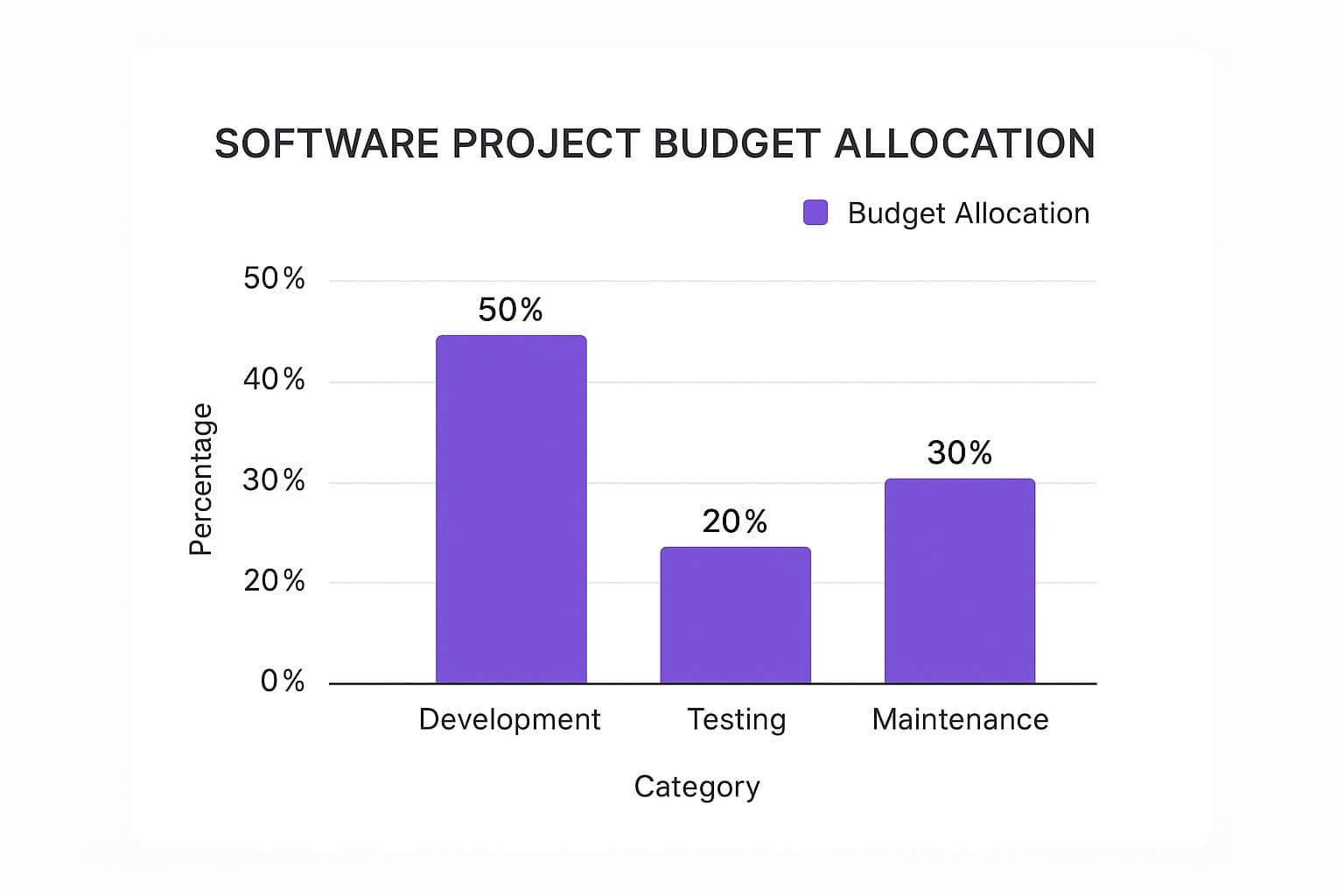
As you can see, development itself often accounts for half the budget. But don't forget that testing and long-term maintenance make up the other half, which really drives home the importance of planning for the entire lifecycle, not just the launch.
Comparing Hourly Rates By Development Model
The financial gap between these team models can be massive. The table below lays out the typical hourly rates you can expect, but remember that these numbers vary based on a provider's location, size, and experience.
| Team/Provider Type | Typical Hourly Rate (USD) | Best For |
|---|---|---|
| In-House Team | 70 - 120+ (fully-loaded) | Companies needing deep integration and long-term product ownership. |
| Local Development Agency | 120 - 250 | Businesses that want a full-service partner without the overhead of hiring. |
| Freelance Developers | 50 - 300 | Short-term projects, specialized tasks, or augmenting an existing team. |
| Offshore/Nearshore Team | 27 - 82 | Cost-sensitive projects with clear requirements and strong management. |
To get an even more granular look at these figures, you can review this complete software development price guide on fullstack.com.
Ultimately, there’s no single "best" choice. The right model depends entirely on your project's needs, your budget, and how much hands-on management you’re prepared to do. By understanding the true costs and benefits of each, you can make a strategic decision that sets your project up for success.
How to Get a Realistic Project Estimate

Turning a great idea into a reliable number isn't about guesswork or pulling figures out of thin air. It’s a process. And while you don't need a technical background to understand it, knowing how developers forecast their time and effort is the key to understanding your software development cost.
My goal here isn't to turn you into a project manager. It’s to give you the confidence to have clear, informed conversations with any development team you work with.
Think of a software estimate like a weather forecast. A meteorologist looks at historical data and current conditions to predict a "70% chance of rain." They can't tell you it will start raining at exactly 2:05 PM, but they can give you a highly educated prediction. A software estimate works the same way—it's a professional forecast based on the best information available, and it always comes with a degree of uncertainty.
Common Estimation Techniques Explained
Developers have a few tried-and-true methods for putting together a financial forecast. The mechanics can get technical, but the core ideas are surprisingly simple. Once you grasp them, the numbers you receive will make a lot more sense.
Here are a few popular techniques you're likely to come across:
- Analogous Estimation: This is the most straightforward approach. We simply look at a similar project we’ve completed and use its actual time and cost as a starting point. For instance, if a basic customer login system took us 80 hours before, we can reasonably estimate a new, similar one will be in that same ballpark. It’s fast, but it’s only as good as the historical data you have.
- Parametric Estimation: This method gets a little more granular. It uses a specific unit or variable from a past project to scale the estimate. Let's say a previous e-commerce site cost 500 per product feature** to build. If your new site needs 40 features, a parametric estimate would land you at **20,000.
- Three-Point Estimation: This is one of the most reliable techniques because it openly acknowledges that things don't always go according to plan. Instead of one number, the team provides three:
These three points are plugged into a formula to create a weighted average, which gives you a much more durable estimate that accounts for potential risks. Smart estimation is a huge part of solid project planning, and it ties directly into resource allocation in project management.
Why a Good Estimate Is Always a Range
If a developer gives you a single, precise dollar amount right at the start, consider it a red flag. Experienced teams will almost always provide a range, like 40,000 - 55,000, because every project has unknowns. An unforeseen technical hurdle, a sudden shift in market needs, or a third-party service changing its API can all throw a wrench in the timeline.
This approach gives the project breathing room. It allows the team to handle unexpected issues without immediately blowing the budget, leading to a much healthier and more collaborative process for everyone involved.
The Foundation of an Accurate Estimate
At the end of the day, the accuracy of any estimate boils down to one thing: the clarity of your requirements.
Vague goals will always lead to vague estimates. If you say, "I need a social media app," the potential scope is absolutely massive. It could mean anything.
But if you say, "I need an app where users can create a profile, post 280-character text updates, and follow other users," you've just given the team something concrete to work with. That level of detail allows them to break the work into small, measurable tasks and estimate each one accurately. The more detailed your vision, the tighter and more reliable your software development cost estimate will be.
Practical Ways to Keep Your Software Costs in Check
Understanding what drives your software development costs is half the battle. The other half is actively managing them. This isn't about cutting corners or shipping a shoddy product. It's about making smart, strategic choices to get the most bang for your buck.
Thankfully, you don't have to reinvent the wheel. There are several tried-and-true methods for keeping a project financially lean without gutting its core purpose. These strategies help you pour your resources into what truly matters, giving your software a much better shot at success once it's out in the wild.
Start with a Minimum Viable Product
The single most effective strategy for controlling costs is launching a Minimum Viable Product (MVP). An MVP is the most basic version of your software that solves a real problem for your first users. It’s not the end-all, be-all version you dream of; it's your first, crucial step into the market.
Building an MVP is an exercise in ruthless prioritization. Instead of building ten features you think people want, you focus on the two or three they absolutely need. This approach slashes your initial development costs, gets you to market faster, and provides a goldmine of real-world user feedback before you sink a bigger budget into the project.
Don't Build What You Can Borrow or Buy
Why build a custom engine when you can just drop a perfectly good one under the hood? The modern software world is packed with powerful open-source libraries, frameworks, and third-party services that can save you a massive amount of development time and money.
- Open-Source Software: Using open-source tools like the Python language, a PostgreSQL database, or the React framework isn't just common; it's standard practice. They're free to use and backed by massive communities, which means no hefty licensing fees.
- Third-Party APIs: Need to process payments? Plug into Stripe. Need maps? Use the Google Maps API. These services handle complex problems for you, freeing up your team to focus on the unique value your software provides.
This path, of course, brings you to a classic crossroads. You have to weigh the pros and cons of using an existing tool versus building your own. We break this down in detail in our guide on whether to build vs. buy software.
Work in an Agile Way
The old-school "waterfall" approach to project management—where you plan everything in detail upfront and build it all in one go—is incredibly rigid. If you're six months in and realize a core assumption was wrong, pivoting can be disastrously expensive.
Agile development is the modern solution. It’s an iterative process that breaks a big project into small, manageable chunks called "sprints." At the end of each sprint (usually two weeks), the team delivers a small, working piece of the software. This creates a constant feedback loop, making it easy to adjust on the fly and ensuring you don't waste money building the wrong thing.
Define Your Requirements with Absolute Clarity
Ambiguity is a budget killer. When requirements are vague or constantly shifting, you get "scope creep"—that dreaded state where a project's goals expand endlessly, blowing past deadlines and budgets. A crystal-clear project scope is your best line of defense.
Before your team writes a single line of code, invest serious time in documentation. This should include:
- User Stories: Plain-English descriptions of a feature from a user’s point of view. For example: "As a user, I want to reset my password so I can get back into my account if I forget it."
- Wireframes: Simple, bare-bones sketches showing the layout and structure of each screen.
- Acceptance Criteria: A clear checklist that defines exactly when a feature is considered "done."
Getting this clarity upfront ensures everyone, from stakeholders to developers, is on the same page. It dramatically reduces misunderstandings and the need for expensive rework down the line. A little extra planning at the start is a direct investment in keeping your software development cost under control.
The Hidden Costs Lurking in Your Software Budget

That initial development quote? Think of it as just the tip of the iceberg. The real cost of bringing software to life stretches far beyond the day the code is "finished." I've seen countless entrepreneurs get blindsided by expenses that only pop up after the product goes live.
A good analogy is buying a car. You pay the sticker price, but that's just the beginning. You still have to budget for gas, insurance, and regular maintenance to keep it on the road. Software is exactly the same—it needs continuous investment to stay secure, functional, and relevant to your users.
To plan your finances realistically, you need to grasp the total cost of ownership (TCO). Let's pull back the curtain on the expenses that often hide in plain sight.
Beyond the Build: Subscription Fees and Licenses
Modern software is almost never built entirely from scratch. It's more like a complex recipe, assembled from a mix of tools, platforms, and services. Many of these ingredients come with their own recurring price tags.
These aren't one-time purchases; they're operational costs that can pile up fast.
Here are a few common ones you can't afford to ignore:
- Server and Infrastructure Costs: Whether you’re on Amazon Web Services, Google Cloud, or another provider, you’re paying every month for the digital real estate your app lives on.
- Third-Party API Fees: Does your app process payments, show maps, or send emails? Services like Stripe, Google Maps, and SendGrid typically charge based on how much you use them. As you grow, so do these bills.
- Software Licenses: Your team likely depends on tools for project management, design, or analytics. Most of these require ongoing subscriptions to stay active.
The Budget You Forgot: Getting Your Product Noticed
Building an amazing product is only half the job. You still have to get people to actually use it. Marketing and sales aren't optional extras; they are fundamental costs for gaining traction and, ultimately, making money.
It’s a classic mistake: founders pour every last dollar into development, leaving the marketing tank empty right at the launch line. A proper budget needs to cover essentials like content creation, digital ads, and sales outreach.
Ignoring these post-launch costs can leave a brilliant piece of software stranded without an audience. And to know if that spending is even working, you have to track the right metrics. Measuring your return requires a solid grasp of key software development KPIs.
Answering Your Lingering Questions About Software Costs
Even after breaking down all the variables, you probably still have a few specific questions. It's only natural. Let's tackle some of the most common ones we hear from clients to help you nail down your budget and strategy.
How Much Should I Budget for Software Maintenance Each Year?
A good rule of thumb is to set aside 15-20% of your initial development cost for annual maintenance. Think of this less as a "just in case" fund and more as a proactive investment in keeping your software healthy and relevant for the long haul.
So, what does that money actually go toward?
- Bug Fixes: No software is perfect. This covers squashing the inevitable issues that pop up after launch.
- Security Patches: Keeping your application and your users' data safe from new threats is non-negotiable.
- Compatibility Updates: Your software needs to keep working smoothly as new OS versions, browsers, and devices are released.
- Server and Hosting: These are the essential infrastructure costs that keep your product online and accessible.
Keep in mind, for large enterprise systems or competitive products that need a constant stream of new features, that percentage can definitely creep higher.
Is a Fixed-Price Contract Better Than an Hourly One?
Honestly, it depends entirely on how well-defined your project is.
A fixed-price contract works best when you have a rock-solid scope and crystal-clear requirements. You get budget certainty, which is great, but it can be rigid and costly if you need to make changes down the road.
On the other hand, an hourly model (often called Time and Materials) offers maximum flexibility. This is the way to go for complex, innovative projects where you expect requirements to evolve as you get user feedback. It just requires a higher level of trust and active collaboration with your development partner.
Why Does Custom Software Cost So Much More?
The higher price tag comes from the simple fact that you're paying for a solution built from scratch, tailored perfectly to your business processes. That's a powerful competitive advantage. The cost covers the entire journey—from discovery and design to coding, testing, and deployment.
Can AI Actually Help Lower My Development Costs?
Yes, but it's not a magic bullet. AI coding assistants can definitely speed things up by handling repetitive tasks, which can trim down the total number of billable hours. In that sense, it makes the process more efficient.
However, if you want to build sophisticated AI features into your own software, you're going to need highly specialized—and expensive—talent. So, while AI can help reduce the cost of the development work itself, integrating it as a core feature will almost certainly drive your overall budget up.
Ready to turn your idea into a market-ready product without the guesswork? Iglu Digital specializes in building and launching MVPs for a price fixed up front. Get your idea built now.