

Your Guide to Agile Software Development Terminology
Table of Contents
The world of agile software development has its own language. This isn't just a collection of buzzwords; it's a specific vocabulary that teams use to plan, build, and ship products effectively. Getting a handle on terms like Sprint, User Story, and Velocity is the first step toward clear communication and making sure everyone is pulling in the same direction.
This shared language is what keeps development efforts tied directly to business goals, creating a foundation for truly collaborative and efficient work.
Why Agile Terminology Is Your Team’s Foundation
Learning the lingo of agile development isn't about memorizing jargon—it's about creating a common ground for everyone involved. When the product owner, the developers, and the stakeholders all share the same vocabulary, you cut down on confusion and speed everything up. It’s how you make sure everyone is on the same page about what needs to be done, how things are going, and what the ultimate goal is.
The proof is in the numbers. Today, around 71% of companies are using Agile in some form, and a staggering 86% of software developers rely on these methods. This isn't a niche approach anymore. A solid understanding of agile terms has become a fundamental skill for anyone in the product development world. For a deeper dive, you can explore more Agile development statistics to see just how widespread it's become.
Before we get into the nitty-gritty of every term, this quick reference table gives you a bird's-eye view of the core concepts. Think of it as a cheat sheet to get you started.
Quick Reference for Core Agile Concepts
| Core Concept | Primary Purpose | Associated Key Terms |
|---|---|---|
| Iterative Development | Building and releasing software in small, repeated cycles. | Sprint, Iteration, Increment |
| Empirical Process Control | Making decisions based on observation and experience, not just theory. | Transparency, Inspection, Adaptation |
| Self-Organizing Teams | Empowering the team to decide how to best accomplish their work. | Cross-functional Team, Swarming |
| Value-Driven Delivery | Prioritizing work based on what delivers the most value to the customer. | User Story, Product Backlog, MoSCoW |
| Continuous Improvement | Regularly reflecting on and improving processes and outcomes. | Retrospective, Kaizen |
This table is just a starting point. The rest of this guide is built to help you dig deeper into these and many other terms.
How This Guide Is Structured
I've organized this guide so you can jump straight to what you need, whether you're just starting out or need a quick refresher on a specific term. Instead of a long, flowing article, think of this as a reference manual you can come back to again and again.
Here’s how it’s broken down:
- Core Agile Principles: We'll begin with the big ideas that are the bedrock of any agile approach.
- Framework-Specific Glossaries: We'll then zoom in on the unique language used in popular frameworks like Scrum and Kanban.
- Planning and Technical Terms: This section covers the vocabulary around work items, estimation techniques, and key engineering practices.
- Scaled Agile Vocabulary: For those working in larger companies, we'll cover terms from frameworks like SAFe that are designed for enterprise-level agility.
Each section is packed with practical examples and connections to other related concepts. It’s designed to be your go-to dictionary for navigating the language of modern software development.
Understanding Core Agile Principles
Before you get lost in the specific terms of frameworks like Scrum or Kanban, it’s crucial to get a solid handle on the core principles that hold up the entire agile philosophy. These ideas are the "why" behind all the practices and events. If you understand them, you'll have the right mindset to apply any agile software development terminology effectively.
One of the most important concepts to internalize is Iterative Development. Forget about building an entire product in one massive, long-haul project. Agile teams work in small, repeatable cycles, often called iterations. At the end of each cycle, you have a working piece of software that can be reviewed, tested, and improved upon.
That leads us right into the next big idea: Incremental Delivery. With every iteration, the team delivers a small, functional "increment" of the final product. For example, the first increment might be a basic login page. The next might add the user profile features. This way, you’re delivering real value to customers much earlier and more frequently.
Structuring Work with Timeboxing
So, how do teams manage these cycles without things getting chaotic? The answer is Timeboxing. This is simply the practice of setting a fixed, non-negotiable amount of time for a specific activity. The most famous example is the Sprint, a timebox that usually runs from one to four weeks, during which the team commits to completing a set amount of work.
This disciplined approach to time is what makes agile development feel both fast and sustainable. It creates a steady, predictable pace that a team can maintain for the long run.
Cultivating an Agile Culture
Agile is as much about people and culture as it is about processes. A key element here is the Self-Organizing Team. This is a group of professionals who are empowered to figure out for themselves the best way to get the work done. Management points them in the right direction by setting the goals, but the team decides how to reach the destination. This autonomy breeds a strong sense of ownership and creativity.
Supporting this kind of team requires a different style of leadership, often called Servant Leadership. In this model, a leader's main job isn't to give orders but to serve the team by clearing roadblocks and ensuring they have everything they need to succeed.
These principles and the language that comes with them have become standard across the industry. The rapid adoption of agile is proof of its effectiveness; between 2016 and 2018, its use among developers jumped from 37% to 86%. This explosion cemented terms like 'iterations' and 'retrospectives' into our everyday vocabulary. You can dig deeper into these agile adoption trends to see just how widespread it has become.
Key Terminology for Scrum Frameworks

Scrum is easily the most popular agile framework out there, and for good reason. It gives teams a clear structure of roles, events, and artifacts to guide their work. Getting a solid grip on this agile software development terminology is the first step for any team wanting to make Scrum work for them.
The heartbeat of the entire process is the Sprint. Think of it as a short, repeatable project cycle, usually lasting between one and four weeks. The goal of every Sprint is to produce a usable, potentially shippable piece of the product. This consistent rhythm is what gives both the team and its stakeholders a sense of predictability.
Understanding Scrum Roles
A great Scrum team is a tight-knit unit—small, cross-functional, and able to manage its own work. There are just three distinct roles, each with a specific part to play in delivering value.
- Product Owner (PO): This individual is the champion for the customer and is ultimately responsible for making sure the product delivers the most value possible. They own and prioritize the Product Backlog.
- Scrum Master: Don't let the name fool you; this isn't the "boss." The Scrum Master is a servant-leader who helps the team perform at its best by removing roadblocks, facilitating events, and coaching everyone on Scrum principles.
- Development Team: These are the experts who actually build the product. They're the designers, developers, testers, and anyone else needed to turn backlog items into a finished increment. The team has the autonomy to decide how to get the work done.
These roles are designed to work in constant collaboration, which helps to cut out the old-school hand-offs and communication bottlenecks. Each role provides a crucial perspective, creating a natural system of checks and balances that keeps the focus squarely on quality.
Core Scrum Artifacts
To keep everyone on the same page, Scrum relies on a few key "artifacts." These are simply tools that represent the work and value, making everything transparent and giving the team regular chances to inspect and adapt.
Product Backlog: This is the master to-do list for the entire product. It's a single, ordered list of every feature, function, fix, or requirement that might be needed. The Product Owner is in charge of keeping it prioritized and accessible to everyone.
A Product Backlog for a new mobile banking app, for instance, might have user stories like these:
- As a user, I want to see my account balance so I can check my funds.
- As a user, I want to transfer money between my accounts so I can manage my finances.
- As a user, I want to set up biometric login so I can access my account securely.
Sprint Backlog: At the start of a Sprint, the Development Team pulls a chunk of work from the top of the Product Backlog. This selection of items, plus their plan for how to get it done, becomes the Sprint Backlog. It's essentially the team's forecast for what they’ll deliver in that Sprint.
Increment: This is the sum of all the work completed during the current Sprint, combined with the work from all previous Sprints. By the end of the Sprint, this new Increment has to be "Done"—meaning it’s in a usable state and meets the team's agreed-upon quality standards.
Key Scrum Events
Scrum events, often called ceremonies, are the formal opportunities for the team to sync up and plan. They provide a predictable structure for the inspect-and-adapt cycle. If you want a deeper dive on running these effectively, our guide to agile methodology meetings is a great resource.
Here are the main events you'll encounter:
- Sprint Planning: This is where the Sprint begins. The whole team gets together to figure out what they can accomplish in the upcoming Sprint and how they'll do it.
- Daily Scrum: You might know this as the Daily Standup. It’s a quick, 15-minute meeting for the Development Team to check in, sync up on progress, and plan their next 24 hours.
- Sprint Review: At the end of the Sprint, the team shows what they built. This is an informal meeting where they demonstrate the new Increment to stakeholders, get feedback, and adjust the Product Backlog if necessary.
- Sprint Retrospective: This is the final event. After the Review but before the next Sprint Planning, the team reflects on the past Sprint. They discuss what went well, what didn't, and come up with concrete ideas for how to improve in the next one.
Understanding Essential Kanban Terminology
While Scrum gives you a structured, time-boxed approach, Kanban is its more flexible, flow-based cousin. The whole point of Kanban is to visualize your work, manage the flow, and get things done efficiently. Getting a handle on its core agile software development terminology is the first step to understanding how it helps teams deliver value nonstop.
The heart and soul of this method is the Kanban Board. Think of it as a big visual chart, broken into columns that map out every stage of your team's workflow. A simple board might just have columns for "To Do," "In Progress," and "Done."
Every task gets its own card, which travels across the board from left to right as work gets done. This simple act of visualization makes it incredibly easy for anyone on the team to see the status of every single work item at a glance.
Mastering Flow with WIP Limits
One of the most powerful—and often misunderstood—ideas in Kanban is the Work in Progress (WIP) Limit. This is a hard-and-fast rule that caps the number of tasks allowed in a specific column at any given time. For instance, your "In Progress" column could have a WIP limit of three.
What does that mean in practice? Team members can't just pull a new task if three items are already being worked on. They first have to help get one of the current tasks finished and moved to the next stage.
This focus on getting things done is a major departure from Scrum, which centers on completing a set batch of work within a Sprint. Kanban is all about continuous flow, not fixed iterations. It’s an effective shift; in fact, a remarkable 87% of Kanban adopters find it more effective than their previous methods. These kinds of agile statistics show the real-world impact of these frameworks.
Measuring Efficiency with Key Metrics
To keep that continuous flow going and find ways to improve it, Kanban uses a few key metrics. Unlike Scrum, which often tracks velocity, Kanban is more interested in how long it takes for work to get through the system.
Two of the most critical metrics here are Lead Time and Cycle Time.
- Lead Time: This is the clock-watcher from the customer's perspective. It measures the total time from the moment a request is made until it’s delivered. It covers the entire journey, from idea to reality.
- Cycle Time: This is a subset of Lead Time and is more of an internal team metric. It tracks the time from when work actually starts on a task until it's finished. It tells you how long it takes to complete a task once you've committed to it.
By keeping an eye on these numbers, teams can make informed decisions to refine their workflow. For example, if Cycle Time starts creeping up, it might be a sign that tasks are too big or that there are hidden delays bogging down the development process. This constant feedback is what helps Kanban teams grow more predictable and efficient over time.
Exploring Agile Planning and Work Item Terms
At the heart of any successful agile project is the ability to break down big, ambitious goals into small, manageable pieces. This isn't just about making work less intimidating; it’s about creating a clear hierarchy that links high-level business objectives directly to the daily tasks developers tackle. Getting a handle on this agile software development terminology is crucial for good planning and tracking.
The biggest, most strategic objective is called a Theme. Think of it as a major organizational goal that drives a whole collection of features. For an e-commerce platform, a Theme might be something like "Improve User Checkout Experience" or "Enhance Mobile Shopping."
Drilling down from a Theme, we get to an Epic. An Epic is a large chunk of work—basically a major feature—that’s too big and complex to knock out in a single sprint. Sticking with our e-commerce example, an Epic under the "Improve User Checkout Experience" Theme could be "Implement One-Click Ordering."
From Epics to Actionable User Stories
The real workhorse of most agile frameworks is the User Story. This is a simple, informal description of a feature written from the perspective of the end user. It’s not a technical spec; it’s a conversation starter. You typically need several User Stories to complete one Epic.
Most User Stories follow a simple but powerful format:
- As a [type of user],
- I want to [perform some action],
- So that [I can achieve some goal].
For our "Implement One-Click Ordering" Epic, a related User Story might be: "As a returning customer, I want to save my payment information so that I can make future purchases faster."
But how do you know when a story is truly finished? That's where Acceptance Criteria come in. These are the predefined conditions that must be met for the story to be considered "done." For the story above, acceptance criteria might include "System securely stores credit card details" and "User can delete saved information at any time."
Finally, a User Story can be broken down even further into Tasks. These are the specific, technical to-do items for the development team, like "Create database table for payment info" or "Design 'Save Card' checkbox UI."
Estimating Work and Measuring Progress
Once the work is laid out, teams need a way to figure out how much effort it will take. Instead of getting bogged down in estimating exact hours, many agile teams use Story Points. These are a relative unit of measure that captures the overall effort needed for a story, considering its complexity, any risks, and the sheer volume of work. It’s less about time and more about difficulty.
A team’s capacity for work is measured by its Velocity—the average number of Story Points it completes in a sprint. Understanding velocity is a game-changer because it helps the team forecast how much work they can realistically take on in the future. For teams trying to decide what to build next, learning about a feature prioritization framework can be a huge help.
To keep an eye on progress, teams often turn to a Burndown Chart. This simple graph shows how much work is left to do in a sprint or release. The vertical axis shows the remaining work (in Story Points), and the horizontal axis tracks time. You want to see that line burning down to zero.
The image below gives a good overview of how key metrics like Velocity and Burndown Charts help teams track their progress.
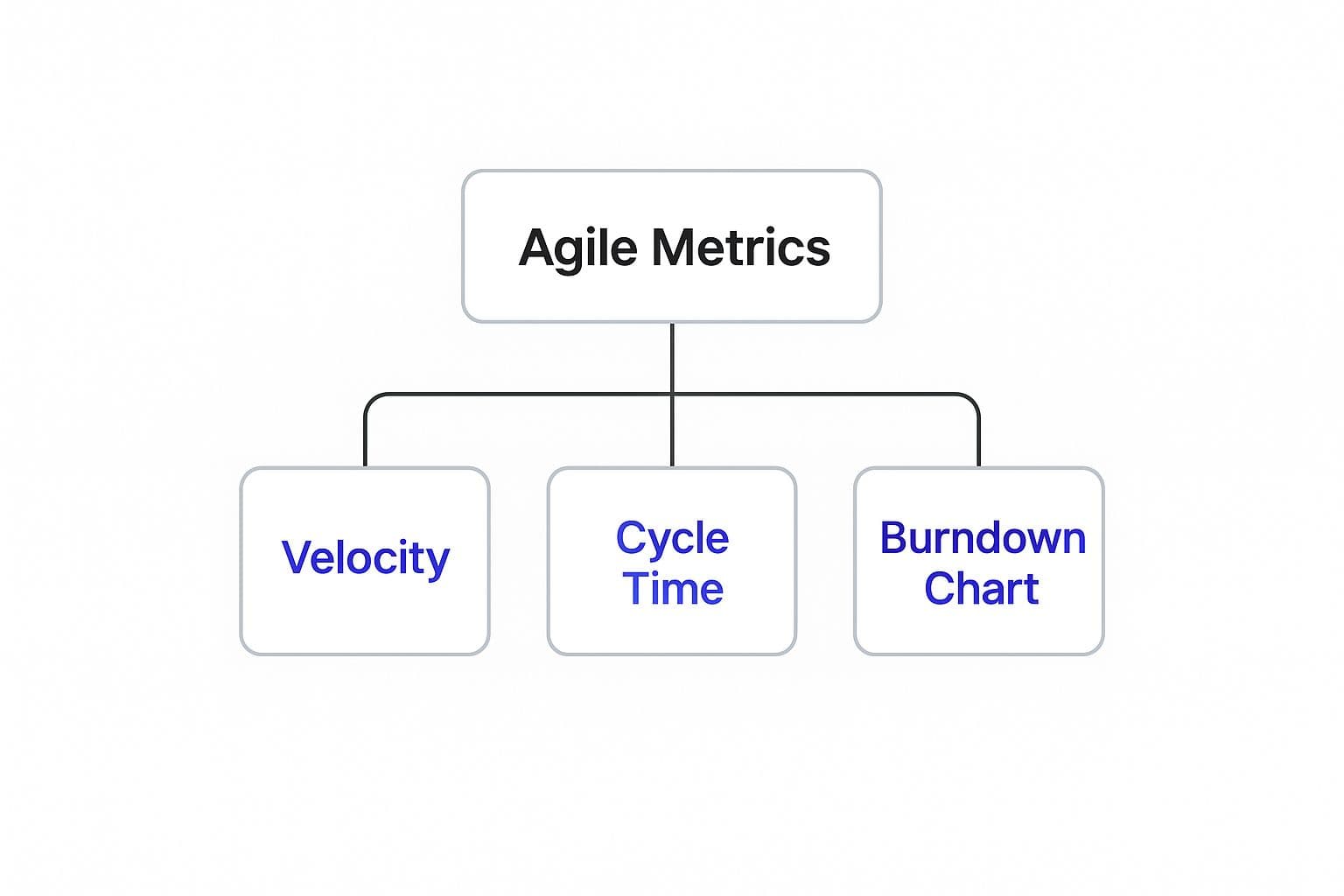
These metrics are all about transparency. A steady, downward-trending Burndown Chart is a great sign that the team is on track to hit its sprint goal.
Decoding Agile Technical and Engineering Practices
Agile isn't just about how you plan your work or run your meetings. The real magic happens in the code. Mastering the core agile software development terminology for engineering is what separates teams just going through the motions from those who are genuinely agile. These technical practices are the engine room of rapid, sustainable development.
You can’t talk about modern agile engineering without starting with Continuous Integration (CI) and Continuous Delivery (CD). While people often say "CI/CD" as if it's one thing, they are two distinct practices that work together to create an automated pipeline from a developer's keyboard to your users.
CI is all about getting developers to merge their code changes into a shared repository, and to do it often. Every time someone merges, an automated process kicks off to build and test the software. This simple habit helps catch integration bugs almost immediately, preventing that last-minute "integration hell" that everyone dreads before a big release.
Automating the Path to Production
Continuous Delivery (CD) is the logical next step after CI. It automates the entire release process, ensuring that any code change passing all the automated tests is ready to be deployed to a live environment with the click of a button. The whole point is to keep the codebase in a deployable state at all times, making releases a non-event rather than a high-stress, all-hands-on-deck affair.
A typical CI/CD pipeline in action looks something like this:
- A developer pushes new code.
- The CI server automatically compiles it.
- A suite of unit and integration tests runs against the new build.
- If everything passes, the application is packaged and deployed to a staging server for a final check.
This level of automation doesn't just make you faster; it makes you better. It builds consistency and predictability into your releases. If you want to dive deeper into how to measure the effectiveness of this process, it’s worth exploring some key software development KPIs.
Building Quality in From the Start
Another foundational practice in agile engineering is Test-Driven Development (TDD). This completely flips the usual script. Instead of writing code and then figuring out how to test it, developers start by writing an automated test that fails because the feature doesn't exist yet. Only then do they write the actual code needed to make that test pass.
It might feel backward at first, but this discipline forces you to think through your requirements before you write a single line of implementation code. The result is a comprehensive safety net of tests that gives your team the confidence to refactor and add new features without breaking what's already there.
Finally, you'll often see agile teams using Pair Programming. This is exactly what it sounds like: two developers working together at one computer. One person is the "driver," actively writing the code, while the other is the "navigator," reviewing the code in real-time and thinking strategically about the overall design and potential issues. This constant, built-in code review leads to higher-quality code with fewer bugs from the get-go. It's also an incredible way to share knowledge and get new team members up to speed quickly.
Understanding Scaled Agile Framework Terminology
When you take agile principles beyond a single team and apply them across a whole organization, you need a new vocabulary to keep everyone on the same page. Scaling agile is all about coordinating multiple teams working on a single, large-scale product, and specialized frameworks provide the language and structure to tackle that challenge.
These frameworks are designed to manage the immense complexity that comes with having dozens, or even hundreds, of people all contributing to the same value stream. They introduce new roles, events, and artifacts specifically for enterprise-level coordination, making sure every team is pulling in the same direction toward shared business goals.
Key Concepts in the Scaled Agile Framework (SAFe)
The Scaled Agile Framework, or SAFe, is one of the most common methods for taking agile enterprise-wide. Its popularity speaks volumes about the need for structured scaling; in fact, SAFe is used by 37% of organizations to manage their large-scale agile projects. You can learn more about how agile is used in a wider business context on TST Technology.
SAFe brings a few critical new terms to the table:
- Agile Release Train (ART): This is the real engine of SAFe. An ART is a long-lived team of agile teams—a virtual organization of 50 to 125 people—that plans, commits, and executes together to deliver a continuous flow of value to the customer.
- Program Increment (PI) Planning: This is the signature event in SAFe. It's a massive, typically two-day planning session where every team on the ART gathers to align and plan their work for the next 8-12 weeks (the Program Increment). This face-to-face collaboration is what creates a shared vision for the upcoming work.
An Introduction to Large-Scale Scrum (LeSS)
Another popular scaling framework is Large-Scale Scrum, or LeSS. As the name implies, its goal is to apply the core principles of Scrum to multiple teams with as little extra process as possible. It’s all about figuring out how to make Scrum work when you have more than one team building a single product.
LeSS keeps things simple and introduces its own terminology to support that philosophy.
- Feature Teams: In LeSS, work is handled by long-lived, cross-functional teams that are laser-focused on delivering complete, customer-centric features from start to finish. This is a big departure from traditional component teams that only work on one technical slice of a system.
- Overall Product Backlog: Instead of each team managing its own backlog, all teams in a LeSS setup pull from one unified Product Backlog. This simple rule ensures that everyone is always working on the highest-priority items for the product as a whole.
Frequently Asked Questions About Agile Terms
As teams start to embrace agile ways of working, a few common questions always seem to pop up. It's totally normal. This section is here to give you quick, straightforward answers to clear up any confusion around agile terminology, making sure those core concepts really stick.
Getting these distinctions right is a huge part of communicating effectively. While some terms might get tossed around interchangeably in casual conversation, knowing their specific meaning within a framework like Scrum or Kanban is what makes the whole system work.
So, What's the Real Difference Between Agile and Scrum?
This is probably the most common question I hear. The easiest way to think about it is that Agile is the big-picture philosophy. It’s a mindset guided by a core set of values and principles. Agile terms like iteration or user story are pretty universal and pop up in lots of different agile methods.
Scrum, on the other hand, is one specific, structured way to do agile. It's a framework with its own set of rules, roles (like Scrum Master and Product Owner), and ceremonies (like the Sprint). In short, Scrum is a flavor of Agile, but Agile is much broader than just Scrum.
How Does Kanban Lingo Differ from Scrum?
The language used in Kanban and Scrum really highlights their different approaches to getting work done. Scrum is all about working in fixed-length Sprints with very specific roles, so its vocabulary is centered around those time-boxed events and responsibilities.
Kanban's terminology—think WIP (Work in Progress) Limits and Cycle Time—is all about creating a smooth, continuous flow of work. Because Kanban is less rigid about roles and doesn't rely on Sprints, its language focuses on visualizing the workflow and making incremental improvements all the time.
This common vocabulary gets everyone, from marketing to engineering, rowing in the same direction with the same definition of success.
Ready to turn your idea into a market-ready product? At Iglu Digital, we specialize in rapid MVP development that gets you to launch faster. Learn how we can build your vision.